Blog Hero  Image

How to Make Money with iPhone 17: Creators' Guide to Earning Back the Cost

Author Image
Mainstack Editorial Team
November 20, 2025
10 min read

Upgrading to an iPhone 17 is more than just buying the latest gadget;, it can be viewed as an investment in your creator career. With every new iteration, Apple packs in camera upgrades, faster chips, and software tools that help content look more polished and get noticed. But that new-phone price tag is real, and creators need to be sure they can earn more than they spend. 

If your current device like an iPhone 15 or 16 still delivers on quality, there may be no rush to upgrade. Still, if you leverage iPhone 17’s new features smartly, you can monetize its power and recoup the cost through creation, sales, or partnerships. 

Let’s explore how.

iPhone 17 Features That Help Creators Earn

  1. Camera & Video Enhancements

The iPhone 17 introduces a larger main sensor, improved optical image stabilization, better low-light performance, and sharper zoom. These upgrades mean creators can shoot cleaner, more professional video especially in dim settings like events or home studios. Cinematic mode and ProRes video give creators tools to distinguish their content from standard mobile footage.

  1. Performance & Speed

With the newer A-series chip, more RAM, and faster write speeds, editing video and photos directly on the phone becomes smoother. Faster rendering, better multitasking, and quicker previews reduce time wasted. The improved storage options (higher capacity) also let creators keep more raw footage and assets without external backups.

  1. Display & Battery

A brighter, more color-accurate display helps when editing in sunlight or when checking color grading. Higher refresh rates make the experience feel smooth, especially in editing apps or scrolling through timelines. Improved battery life means longer shooting sessions, fewer mid-shoot shutdowns, and less downtime charging.

  1. Connectivity & Accessories

Faster 5G, enhanced WiFi bands, and better Bluetooth connectivity improve uploading speed and live streaming quality. Supporting accessories such as external mics, gimbals or lenses matter more when the base hardware can support high bit-rate video or external-device input without lag.

  1. Software Tools & Ecosystem

Apple continues building tools and software features like photo and video editing apps, filters, live streaming tools, and seamless iCloud sync. Features like seamless backup, sharing, and cloud workflows mean less time lost managing files and more time creating.

Ways Creators Can Monetize Using the iPhone 17

Video Content
Post high-quality Reels, Shorts, TikToks, YouTube content. With iPhone 17’s improved camera, your content can look more professional, helping attract larger audiences and monetize via ad revenue or brand partnerships.

A content creator making video content

Photography & Stock
Thanks to the upgraded sensor and image clarity, you can shoot stock photos for marketplaces like Shutterstock or Adobe Stock. Also shoot paid commissioned photography; social media photos, portraits, or product shots.

Live Streaming & Virtual Events

Use the front and rear cameras to host live workshops, Q&A sessions, or streaming classes. The iPhone 17’s faster connectivity helps reduce lag and maintain quality during livestreams.

Vlogging / Podcasting with Video

If you vlog or do podcasts with video, the iPhone 17 lets you capture high-quality video with good audio (especially if paired with external mic). You can also record video “bites” for content repurposing, e.g., social clips, teasers.

Selling Digital Products

Use your iPhone 17 to create presets, LUTs, photo filters, templates, or motion graphics. Sell them on marketplaces or your own site. Since you already own the hardware, profit margins are high.

Sponsored Content & Brand Deals

Higher-quality visuals make your content more attractive to brands. When you can show photos or videos that look sharp, clean, and professional, you are in a stronger position to pitch for sponsorships or paid collaborations.

Recovering the Cost: Strategy & When Upgrading Makes Sense

Cost vs Expected Revenue

Calculate device cost + accessories + any subscriptions vs projected earnings. For example, if you can make $20-$50/month more with better video or photo quality, you may recover costs in 6-12 months.

Leveraging Micro-services

Offer small gigs: social media clips, editing or retouching, stock photos. These help recoup cost bit by bit.

Are Old iPhone 15 / 16 Models Enough?

If you already own iPhone 15 or 16 and your video, camera, and editing needs are met, waiting might make sense. Upgrading only becomes essential when image quality, speed, or battery life begins to limit your growth or deliverables.

Break-Even Analysis

A break-even analysis helps you figure out how long it will take to earn back the cost of your iPhone 17 through the extra income it brings you.

Here’s how to do it in plain steps:

  1. Find the Total Cost
    Write down how much the iPhone 17 costs, including accessories or insurance if you’re buying them too.
  2. Estimate Your Extra Monthly Income
    Think about how much more money you expect to make each month using the new phone. For example, from creating better content, landing new clients, or running your business faster.
  3. Divide Cost by Extra Income
    Take the total cost of the phone and divide it by your estimated extra monthly income.
  • Example: Phone costs $1,200. Extra income per month = $300.
  • $1,200 ÷ $300 = 4 months to break even.

If the extra income is less than the phone’s cost, it might be better to wait or save up before upgrading.

Practical Tips to Maximize Earnings Using iPhone 17

  • Use the native camera app or high-quality third-party apps that unlock full sensor potential.
  • Shoot during golden hour or good lighting to reduce editing needs.
  • Learn to use features like ProRes, Cinematic, or Photonic Engine (if available) for signature look.
  • Use presets or LUTs to speed up editing.
  • Keep your files organized by using clear folders, tags, and file names. Add helpful details (metadata) to make them easy to find later, and back everything up to cloud storage so you never lose important work.
  • Invest in small accessories like tripod, mic, lenses, etc that boost production value.

Risks & Drawbacks Before Upgrading

  • Depreciation: New Apple phones lose resale value.
  • Storage limitations: If you get a model with low storage, video and raw files may fill up fast.
  • Battery lifespan: Heavy use drains battery and battery health declines with time.
  • Time investment: Learning new features, workflows, and editing tools takes effort.

Investing in the iPhone 17 can be a smart move if you’re a creator serious about stepping up your content quality, speed, and professionalism. The camera upgrades, better performance, improved battery, and software tools are not just luxury, they are instruments that can help you earn back what you spend through video, photo, sponsorships, and product sales. 

That being said, if your iPhone 15 or 16 still meets your needs and does not limit your creativity, there is no urgent need to upgrade. Your time, skills, and consistency often matter more than the hardware alone. Before buying, plan out how you will monetize its features. Monetizing your iPhone 17 turns it from an expense into an investment, one that pays off when used with purpose.
Upgrading to an iPhone 17 is more than just buying the latest gadget;, it can be viewed as an investment in your creator career. With every new iteration, Apple packs in camera upgrades, faster chips, and software tools that help content look more polished and get noticed. But that new-phone price tag is real, and creators need to be sure they can earn more than they spend. 

If your current device like an iPhone 15 or 16 still delivers on quality, there may be no rush to upgrade. Still, if you leverage iPhone 17’s new features smartly, you can monetize its power and recoup the cost through creation, sales, or partnerships. 

Let’s explore how.

iPhone 17 Features That Help Creators Earn

  1. Camera & Video Enhancements

The iPhone 17 introduces a larger main sensor, improved optical image stabilization, better low-light performance, and sharper zoom. These upgrades mean creators can shoot cleaner, more professional video especially in dim settings like events or home studios. Cinematic mode and ProRes video give creators tools to distinguish their content from standard mobile footage.

  1. Performance & Speed

With the newer A-series chip, more RAM, and faster write speeds, editing video and photos directly on the phone becomes smoother. Faster rendering, better multitasking, and quicker previews reduce time wasted. The improved storage options (higher capacity) also let creators keep more raw footage and assets without external backups.

  1. Display & Battery

A brighter, more color-accurate display helps when editing in sunlight or when checking color grading. Higher refresh rates make the experience feel smooth, especially in editing apps or scrolling through timelines. Improved battery life means longer shooting sessions, fewer mid-shoot shutdowns, and less downtime charging.

  1. Connectivity & Accessories

Faster 5G, enhanced WiFi bands, and better Bluetooth connectivity improve uploading speed and live streaming quality. Supporting accessories such as external mics, gimbals or lenses matter more when the base hardware can support high bit-rate video or external-device input without lag.

  1. Software Tools & Ecosystem

Apple continues building tools and software features like photo and video editing apps, filters, live streaming tools, and seamless iCloud sync. Features like seamless backup, sharing, and cloud workflows mean less time lost managing files and more time creating.

Ways Creators Can Monetize Using the iPhone 17

Video Content
Post high-quality Reels, Shorts, TikToks, YouTube content. With iPhone 17’s improved camera, your content can look more professional, helping attract larger audiences and monetize via ad revenue or brand partnerships.

A content creator making video content

Photography & Stock
Thanks to the upgraded sensor and image clarity, you can shoot stock photos for marketplaces like Shutterstock or Adobe Stock. Also shoot paid commissioned photography; social media photos, portraits, or product shots.

Live Streaming & Virtual Events

Use the front and rear cameras to host live workshops, Q&A sessions, or streaming classes. The iPhone 17’s faster connectivity helps reduce lag and maintain quality during livestreams.

Vlogging / Podcasting with Video

If you vlog or do podcasts with video, the iPhone 17 lets you capture high-quality video with good audio (especially if paired with external mic). You can also record video “bites” for content repurposing, e.g., social clips, teasers.

Selling Digital Products

Use your iPhone 17 to create presets, LUTs, photo filters, templates, or motion graphics. Sell them on marketplaces or your own site. Since you already own the hardware, profit margins are high.

Sponsored Content & Brand Deals

Higher-quality visuals make your content more attractive to brands. When you can show photos or videos that look sharp, clean, and professional, you are in a stronger position to pitch for sponsorships or paid collaborations.

Recovering the Cost: Strategy & When Upgrading Makes Sense

Cost vs Expected Revenue

Calculate device cost + accessories + any subscriptions vs projected earnings. For example, if you can make $20-$50/month more with better video or photo quality, you may recover costs in 6-12 months.

Leveraging Micro-services

Offer small gigs: social media clips, editing or retouching, stock photos. These help recoup cost bit by bit.

Are Old iPhone 15 / 16 Models Enough?

If you already own iPhone 15 or 16 and your video, camera, and editing needs are met, waiting might make sense. Upgrading only becomes essential when image quality, speed, or battery life begins to limit your growth or deliverables.

Break-Even Analysis

A break-even analysis helps you figure out how long it will take to earn back the cost of your iPhone 17 through the extra income it brings you.

Here’s how to do it in plain steps:

  1. Find the Total Cost
    Write down how much the iPhone 17 costs, including accessories or insurance if you’re buying them too.
  2. Estimate Your Extra Monthly Income
    Think about how much more money you expect to make each month using the new phone. For example, from creating better content, landing new clients, or running your business faster.
  3. Divide Cost by Extra Income
    Take the total cost of the phone and divide it by your estimated extra monthly income.
  • Example: Phone costs $1,200. Extra income per month = $300.
  • $1,200 ÷ $300 = 4 months to break even.

If the extra income is less than the phone’s cost, it might be better to wait or save up before upgrading.

Practical Tips to Maximize Earnings Using iPhone 17

  • Use the native camera app or high-quality third-party apps that unlock full sensor potential.
  • Shoot during golden hour or good lighting to reduce editing needs.
  • Learn to use features like ProRes, Cinematic, or Photonic Engine (if available) for signature look.
  • Use presets or LUTs to speed up editing.
  • Keep your files organized by using clear folders, tags, and file names. Add helpful details (metadata) to make them easy to find later, and back everything up to cloud storage so you never lose important work.
  • Invest in small accessories like tripod, mic, lenses, etc that boost production value.

Risks & Drawbacks Before Upgrading

  • Depreciation: New Apple phones lose resale value.
  • Storage limitations: If you get a model with low storage, video and raw files may fill up fast.
  • Battery lifespan: Heavy use drains battery and battery health declines with time.
  • Time investment: Learning new features, workflows, and editing tools takes effort.

Investing in the iPhone 17 can be a smart move if you’re a creator serious about stepping up your content quality, speed, and professionalism. The camera upgrades, better performance, improved battery, and software tools are not just luxury, they are instruments that can help you earn back what you spend through video, photo, sponsorships, and product sales. 

That being said, if your iPhone 15 or 16 still meets your needs and does not limit your creativity, there is no urgent need to upgrade. Your time, skills, and consistency often matter more than the hardware alone. Before buying, plan out how you will monetize its features. Monetizing your iPhone 17 turns it from an expense into an investment, one that pays off when used with purpose.
Make money online selling what you know. Mainstack makes it easy for you to showcase and get paid.

Find out more
Related Articles
How-Tos
The 9 Best Affiliate Marketing Platforms in Nigeria (2025 Reviews & Rankings)
Discover the 9 best affiliate marketing platforms in Nigeria for 2025. Compare commissions, products, and features to choose the right platform for earning
Mainstack Editorial Team
December 2, 2025
10 min read
Read more
Button ArrowButton Arrow

Since affiliate marketing became popular, several Nigerians have adopted it as a way to make an income online. With so much opportunity in this industry, it’s no surprise that dozens of affiliate marketing platforms have popped up, with each promising several benefits.

But here’s the truth: 

Choosing the right affiliate marketing platform in Nigeria is confusing. It’s also where most people get stuck. Some platforms exaggerate earnings. Others have poor product quality or delayed payment. And wasting time on testing the wrong affiliate platform can slow down your entire journey.

This article solves that problem. We reviewed and ranked the 9 best affiliate marketing platforms in Nigeria for 2025 based on trust, commission rates, product quality, payout speed, and ease of use. 

What is Affiliate Marketing? 

Affiliate marketing is a performance-based business online where you earn a commission every time a customer buys a product (or service) through your link. 

It’s as simple as, you find existing products (or service), promote it to an audience, and get paid for every successful sale you influence. 

What is an Affiliate Platform?

An affiliate platform is a marketplace that connects people (sometimes called merchants) with existing products (or service) and affiliates who can promote the product. The platform acts as a middle man and provides everything both sides need including unique affiliate links, tracking tools, dashboard to monitor everything and payout details.

What Makes a Great Affiliate Platform

To find the best affiliate platforms, it helps to know what to look for. A good affiliate program typically includes:

  • Transparent and fair commissions: Good affiliate platforms have no hidden costs and prioritize offer transparency behind payment-related fees or platform fees.
  • Payout Methods:  Affiliates and merchants should be able to withdraw earnings frequently without delays (at least a 24-hour payout).
  • Ease of Use & Tracking: The platform must provide clear tracking and reporting tools so you can track commissions and measure performance. 
  • Product/Service Relevance: Good affiliate platforms have a diverse product catalog that fits your audience’s needs and price levels.
  • Support and Community: Alongside tools, these platforms must also come with a community of marketers and good customer service.

How do Affiliate platforms work?

Affiliate programs work in a pretty simple way. You sign up on the website as an affiliate, and get access to a marketplace of products to promote. Take note that some platforms are free while others might require a small fee, but once you’re in, you get access to the dashboard.

Inside the dashboard, you’ll get access to a list of products, which are often grouped by categories. When you find a product that matches your niche and commission requirements, the platform generates a special tracking link for you to start promoting the product.

The 9 Best Affiliate Marketing Platforms in Nigeria (2025 Reviewed & Ranked List)

1.) Mainstack

Mainstack’s affiliate marketplace is a popular affiliate marketing platform with thousands of affiliates and a wide range of digital products available for promotion. It’s built on Mainstack’s powerful e-commerce tools.

Mainstack is tailored to serve a global market. This means anyone, anywhere, can register on the platform without worrying about currency barriers or payout restrictions. 

Creating a Mainstack account and joining the marketplace as an affiliate is completely free. There’s no restrictions, and you can set up your affiliate account in less than 10-minutes. Unlike traditional affiliate programs that only gives you links, Mainstack affiliates get full access to the entire Mainstack toolset, including analytics, product pages, checkout tools etc.

On the platform, you get access to primarily digital products in different niches, including courses, coaching programs, event tickets etc, in different niches. Commissions are set by the merchant (and not the platform) and affiliates can see commissions before choosing the product.

Affiliate platform features

  • Payment Plan: Payments are processed in 24-hours
  • Payment Method: Debit cards, Bank transfer or Paypal (mulit-currency options available)
  • Platform Support: Yes

2.) Jumia

Jumia’s affiliate program gives you a chance to earn commissions by promoting e-commerce products. This ranges from electronics, fashion and even household items that can be found on Jumia.

The product variety and market is one of the best features of the Jumia affiliate market place. That, plus, there’s a wide audience across Africa, which means affiliates have little restrictions even when promoting physical products.

Signing up for the Jumia Affiliate Program is free. There is no entry fee, and registration can be done directly, usually via their affiliate/KOL registration portal. Once approved, you receive unique affiliate links and access to promotional materials (banners, text links, etc.) to start promoting your offer.

Payment commission on Jumia varies by category, by can be up to 11%. For example, electronics may have lower percentages, while fashion or other niches may offer higher. 

Affiliate platform features

  • Payment Plan: Monthly payout cycle; commissions from sales you generate are paid after verification when you hit the minimum threshold.
  • Payment Method: Direct bank transfer
  • Platform Support: Yes

3.) Truehost Cloud

Truehost Cloud is a regional hosting provider that provides web hosting with dedicated servers to clients in Nigeria and Africa. The affiliate program allows you to earn commissions by promoting web hosting and domain registration services. This includes hosting packages, domain names, SSL certificates, and other web services offered on Truehost Cloud.

Signing up for the Truehost Cloud Affiliate Program is free. There is no entry fee, and once approved, affiliates receive unique referral links and access to promotional materials like banners, text links, and landing pages to start promoting immediately.

Commission rates on Truehost Cloud are competitive, usually ranging between 20% to 50% per sale, depending on the product and package sold. Affiliates earn on both one-time purchases and recurring hosting subscriptions, giving an opportunity for ongoing income.

Affiliate platform features

  • Payment Plan: Monthly payout cycle; commissions from sales you generate are paid after verification when you hit the minimum threshold.
  • Payment Method: Direct bank transfer or other local payment options supported by Truehost Cloud.
  • Platform Support: Yes, affiliates have access to dashboards, tracking tools, and support to optimize promotions.

4.) Travelstart

If you’re in the travel space, then Travelstart is a great way to earn extra income as an affiliate.

Travelstart’s affiliate program allows you to earn commissions by promoting flights, hotels, and travel packages across Africa and beyond. Affiliates can earn by referring customers who book flights, hotels, or complete travel deals through Travelstart’s platform. The product variety and market is one of the standout features of Travelstart’s affiliate program.

Signing up for the Travelstart Affiliate Program is free. There is no entry fee, and once approved, affiliates receive unique referral links and access to promotional tools such as banners, text links, and landing pages to help start promoting right away.

Commission rates on Travelstart vary depending on the service promoted. For example, flights may have different commission rates compared to hotel bookings. Rates are generally competitive within the travel affiliate space, allowing affiliates to earn recurring or one-time commissions depending on the customer’s booking behavior.

Affiliate platform features

  • Payment Plan: Monthly payout cycle
  • Payment Method: Direct bank transfer or other supported local payment methods.
  • Platform Support: Yes

5.) Oraimo

Oraimo is a brand known for mobile accessories and smart electronics like power banks, earbuds, fast chargers, and smart accessories. In Nigeria and several other countries they run an affiliate system called the Commission Affiliate Program and also a Points Affiliate Program. 

The commission affiliate program offers cash benefits to marketers who share their unique affiliate link online as well as recruit other affiliate marketers with cash rewards. The points affiliate program however, rewards the marketers with points that can be used to get discounts on purchases made via the Oraimo shop. 

Affiliate platform features

  • Payment Plan: Payments are made based on request and take 7-10 working days to be in effect
  • Payment Method: Direct bank transfer
  • Platform Support: Yes

6.) Konga

Konga is another leading Nigerian marketplace and remains widely used. Their platform offers a wide range of products with a catalog that covers many categories.

The Konga affiliate program supports affiliates with product links, banners, and commission reports. In recent times, Konga has continued to refine its offering to be competitive with other retailers. Affiliates who already write product reviews, run comparison sites, or manage coupon communities will find this program useful. Strong local logistics and product choices. Works well for price comparison and product review sites.

Affiliate platform features

  • Payment Plan: Payments are made monthly based on request
  • Payment Method: Direct bank transfer
  • Platform Support: Yes

7.) Shopify

Shopify is one of the world’s most popular e-commerce platforms, trusted by millions of entrepreneurs, creators and businesses to build, manage and scale online stores. It provides an all-in-one system for selling products, managing inventory, processing payments and marketing to customers globally.

Affiliates earn commissions on the platform by referring new merchants to Shopify through unique referral links. The platform also equips affiliates to tracking dashboards, promotional materials, and dedicated affiliate support to help improve performance.

Affiliate Platform Features

  • Payment Plan: Payouts are processed twice a month
  • Payment Method: Payments are made via PayPal in USD or a direct deposit to your local bank
  • Platform Support: Yes 

8.) Bet9ja

Bet9ja is Nigeria’s major sports betting company that includes an affiliate program where you get a commission from referring players. 

You will receive commission based on player activity (stakes, net revenue) via your affiliate/referral link.The commission rate can be up to 20% (depending on your referral activity / traffic). The platform offers the provision of marketing tools such as banners, tracking links, affiliate dashboard.

Affiliate platform features

  • Payment Plan: Payments are made monthly based on request
  • Payment Method: via Bank transfer (to a Nigerian account) or Direct deposit
  • Platform Support: Yes

9.) Expertnaire

                                         Source: Expertnaire

Expertnaire is a marketplace for digital courses, bootcamps, and information products which are created by vendors and made available for sale through their platform. 

Their affiliate program however comes with a catch, to sign up, a prospective affiliate marketer needs to pay a sum of #10,000 naira every year as a sign–up fee. But their commission rates are generous and can go as high up as 75% and their platform is optimized for local payments and conversions. 

Affiliate platform features

  • Payment Plan: Payments are made monthly based on request
  • Payment Method: via Bank transfer (to a Nigerian account) or Direct deposit
  • Platform Support: Yes

Affiliate Marketing Platform FAQ

  • Q: What Affiliate network is best for beginners?
  • A: Mainstack’s affiliate network is beginner-friendly because they’re easy to join and have clear tracking tools.
  • Q: What are the best affiliate marketing platforms in Nigeria?
  • A: Platforms like Mainstack and Jumia are top choices for Nigerians.
  • Q: Which affiliate program pays the highest commissions?
    A: Expertnaire offers commissions up to 75%
  • Are affiliate platforms legit?
    A:Yes, they are legit
  • Q:How do I track my clicks, sales, and commissions?
    A: Most platforms come with a dashboard that give their marketers a transparent view of clicks and sales earned
  • Q: Can I promote my Affiliate links on WhatsApp, TikTok, or Instagram without running ads?
    A: Yes, you can promote your links without running ads

Start earning with affiliate platforms

The Affiliate marketing industry in Nigeria rewards focus and relevance which is why in order to get meaningful results, you need to be consistent. Keep up with the latest trends in the affiliate environment and choose a platform that fits your content style. Promote products you genuinely believe in, and track your performance to see what works. Every click and conversion comes easier when your recommendations feel authentic.

If you want to get started promoting Affiliate products, register on Mainstack's Affiliate marketplace to start promoting your product.

How-Tos
How to Run Facebook Ads: Step-by-Step Tutorial + Free Checklist
Learn how to run Facebook ads in 2025 with this complete step-by-step guide. Master ad targeting, budgeting, placements, and creative design.
Mainstack Editorial Team
November 20, 2025
10 min read
Read more
Button ArrowButton Arrow

Selling products online is more competitive than ever, and Facebook remains one of the most effective platforms to reach your audience. With billions of active users and advanced targeting options, Facebook ads enable creators, entrepreneurs, and businesses to showcase their business offerings directly to the people most likely to buy. 

While scrolling through Facebook or Instagram, you’ve probably noticed ads popping up between posts, Stories, or Reels. But those aren’t random; they’re targeted campaigns businesses use to reach people just like you. And the reason they’re everywhere is simple: Facebook ads improve reach.

Facebook, through the Meta Ads Manager, gives businesses of all sizes the ability to target the right audience with precision. Whether you aim to drive traffic, boost sales, or generate leads, you can create a campaign tailored to your specific goals.

This step-by-step guide will walk you through exactly how to run Facebook ads in 2025, from setup to monitoring, so you can launch campaigns that convert.

What Are Facebook Ads?

Facebook ads are paid promotions that businesses create to reach specific audiences across Facebook, Instagram, Messenger, and the Audience Network— Meta’s group of partner apps and websites. This means your ads aren’t limited to Meta platforms alone; they can also appear in mobile apps or news sites outside of Facebook that are part of Meta’s advertising network.

Unlike regular posts, which only reach your followers (and maybe a few friends through shares), ads are designed to target people based on their demographics, interests, and behavior, giving you a much wider and more precise reach.

Boosted Posts vs. Facebook Ad Campaigns

It’s important to understand the difference between a boosted post and a full Facebook ad campaign, because while they may look similar, they serve very different purposes:

Boosted Post

This is achieved when you take an existing post from your page and pay Meta to show it to a larger audience. It’s a quick and simple way to increase visibility, but it offers limited control over who sees the post, where it appears, and what specific outcome you’re optimizing for.

Facebook Ad Campaign (via Ads Manager)

This gives you full control over your advertising strategy. With a Facebook ad campaign, you can choose exactly what you want to achieve (like driving sales, getting leads, or boosting website traffic), define your audience in detail, set your budget and schedule, decide where your ads will appear, and even test multiple versions of the same ad to see which performs best. This flexibility makes Ads Manager the recommended option for running serious, goal-driven campaigns.

Ultimately, whether you’re running a single ad or a full campaign, everything is managed through Meta Ads Manager, the centralized hub where all ads are created, managed, and optimized. It’s also a tool you’ll need to master to get consistent results. Now that you know what Facebook ads are, it’s important to understand why they are powerful tools for growing your business.

Benefits of Advertising Your Business on Facebook

Advertising on Facebook offers clear advantages for businesses of any size, and three of the most important are:

  • Precise targeting: Meta’s ad tools let you reach people based on age, location, interests, behaviors, or even custom lists. This makes it easier to connect with the right audience instead of wasting spend on those unlikely to care about your offer.
  • Flexible budgets with measurable results. You can start with a small daily budget, test different ads to see which ones perform better, and then increase your budget on the ads that bring the best results. Ads Manager also makes tracking your Facebook ads budget simple by showing exactly what you’re spending and what you’re getting in return in real time.
  • Multiple ad formats to match your goals. Facebook ads can appear as videos, single images, or carousels. You can also run ads that include a simple form, where people quickly share their name or email without leaving Facebook. This way, you get different tools to either grab attention, showcase products, or collect customer details depending on what matters most for your business.

How to Run Ads on Facebook Ads (Step-by-step)

Getting started with Facebook ads might feel overwhelming at first, but Meta Ads Manager makes the process a lot more structured. By following a step-by-step approach, you can go from setting up your account to launching your first ad without missing anything important. Here’s a simple breakdown of how to run ads on Facebook.

Step 1: Set Up Meta Business & Ads Manager

Screenshot of the 2025 Meta Ads Manager dashboard showing campaign overview, and navigation menu in the layout.

Before you can create digital product ads, you need the right setup.

1. Create a Meta Business Manager Account

  • Go to business.facebook.com.
  • Sign in with your Facebook account and set up a free Meta Business Manager account.
  • This gives you professional tools to manage ads, pages, and assets in one place.

2. Create a Facebook Business Page
Ads cannot be run from personal profiles. You’ll need a business page.

  • Go to your Facebook homepage, click Pages, and create one if you don’t have one already.
  • Choose a business name, category (e.g., “Education” for digital courses), and complete your page details.

3. Add Payment Information

  • In Business Manager, navigate to Business Settings > Payments.
  • Add your credit card, PayPal, or other payment method.

Step 2: Create Your Campaign in Ads Manager

Once your foundation is ready, it’s time to build your campaign.

1. Go to Ads Manager

  • Inside Business Manager, click All Tools > Ads Manager.
  • This is the hub for creating, managing, and monitoring ads.

2. Click “+ Create”

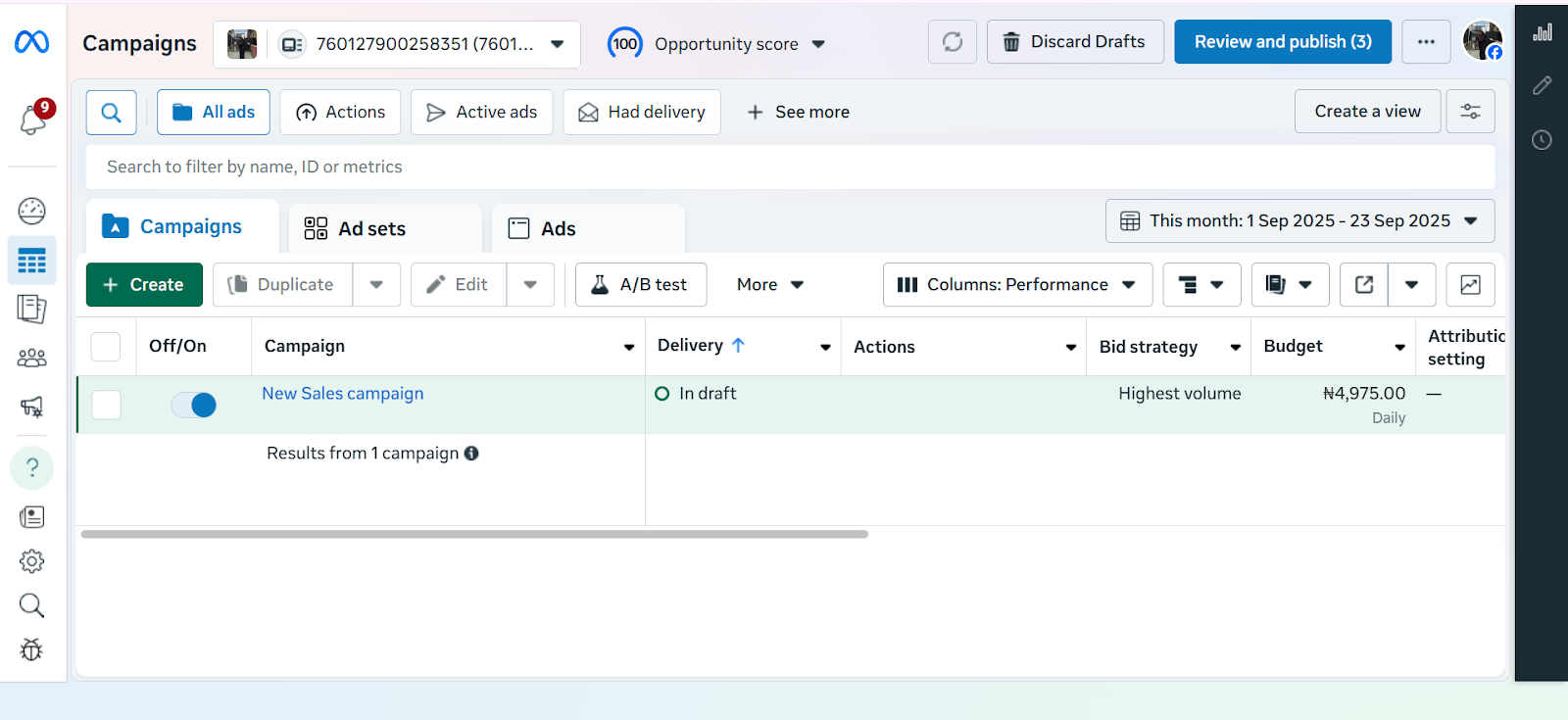
  • Hit the green + Create button to start a new campaign.

Step 3: Choose Your Objective

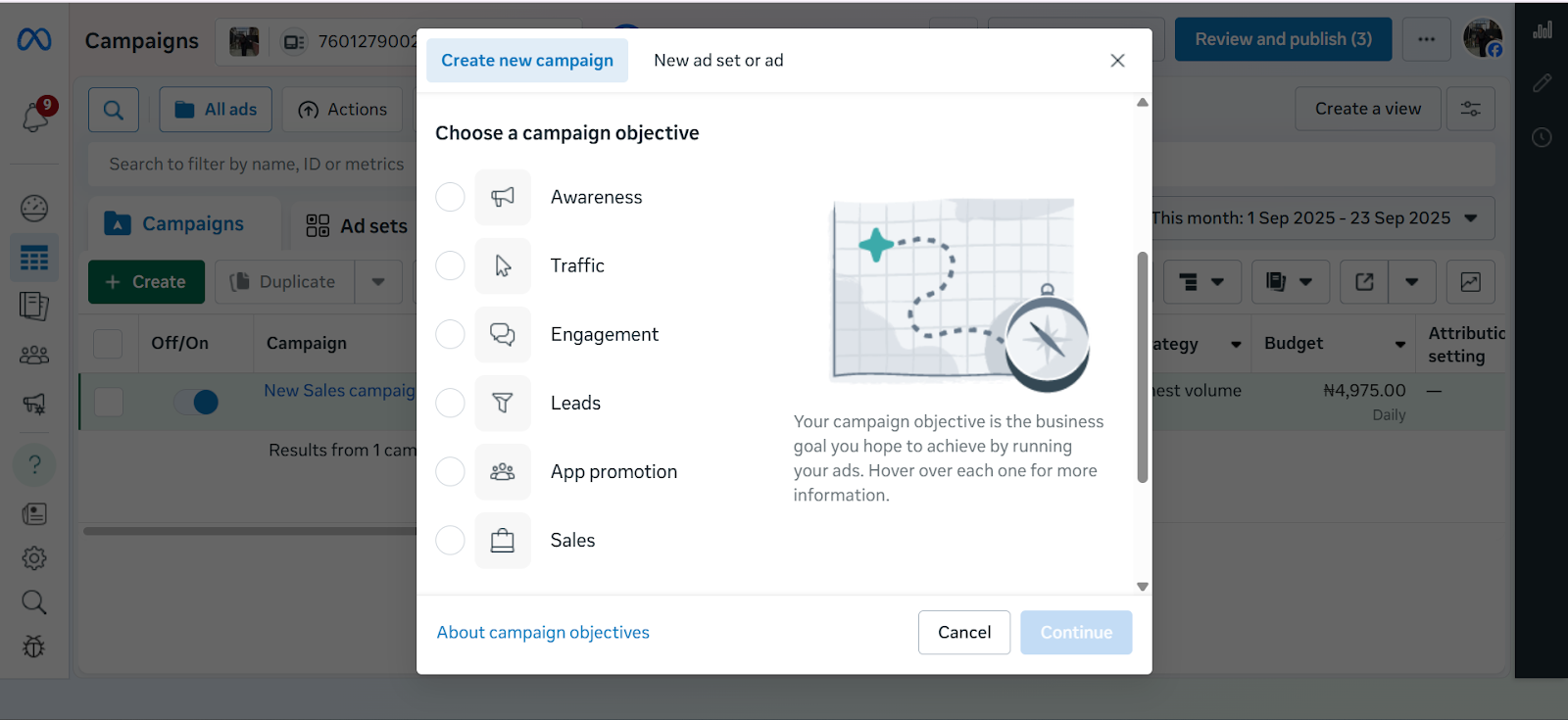
Screenshot of Meta Ads Manager displaying the list of campaign objectives including Awareness, Traffic, Engagement, Leads, App Promotion, and Sales.

When creating a campaign in Meta Ads Manager, the first step is choosing your advertising objective which is the main thing you want your ad to achieve. Meta currently offers six objectives:

Awareness – Best for getting your brand in front of as many people as possible. Useful if you’re just starting out or launching something new.

Traffic – Drives people to a website, landing page, or app. Helpful if you want more visits to your online store or product page.

Engagement – Encourages actions like likes, comments, shares, or event responses, making it easier to build a community around your brand.

Leads – Collects contact details (like emails or phone numbers) directly through Facebook forms or your own landing page.

App Promotion – Helps you get more people to download or use your mobile app.

Sales – Optimises your ads to drive actual purchases, either on your website, in your app, or directly through Facebook and Instagram Shops. Meta does this by showing your ads to people most likely to buy based on their past activity, e.g., clicking “add to cart” or completing a purchase. You can also connect your product catalogue so your ads automatically display items in stock, making it easier for customers to shop directly.

Step 4: Name Your Campaign

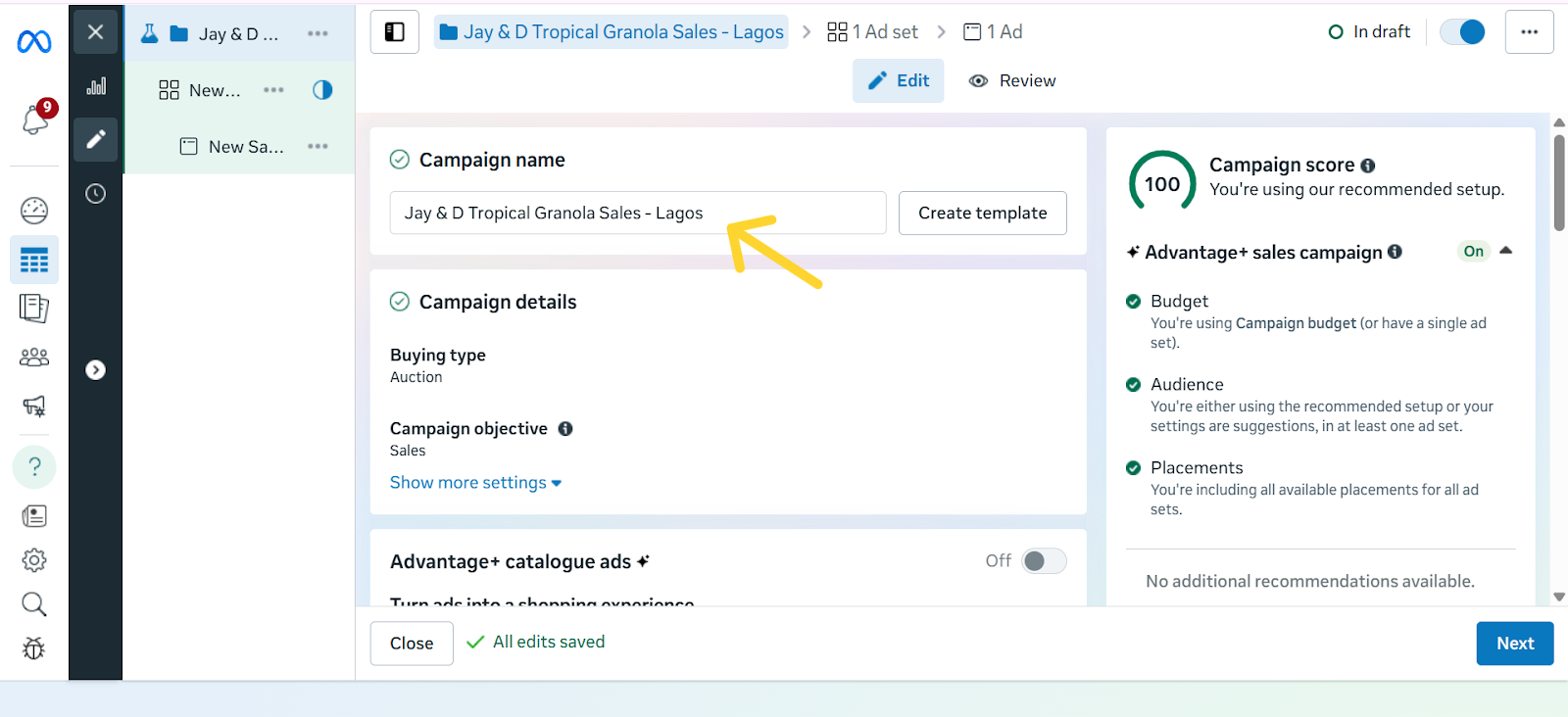
Screenshot highlighting the ‘Name Your Campaign’ field in Meta Ads Manager with an arrow pointing to the text box where users enter the campaign name.

Give your campaign a clear, descriptive name so you can easily identify it later. A good rule of thumb is to include the product, audience, and goal in the name. For example: “Tropical Granola – Abuja – Traffic” or “Ebook Launch – US – Sales.” This makes it easier to stay organised, especially once you start running multiple campaigns at the same time.

Step 5: Set Your Budget & Schedule

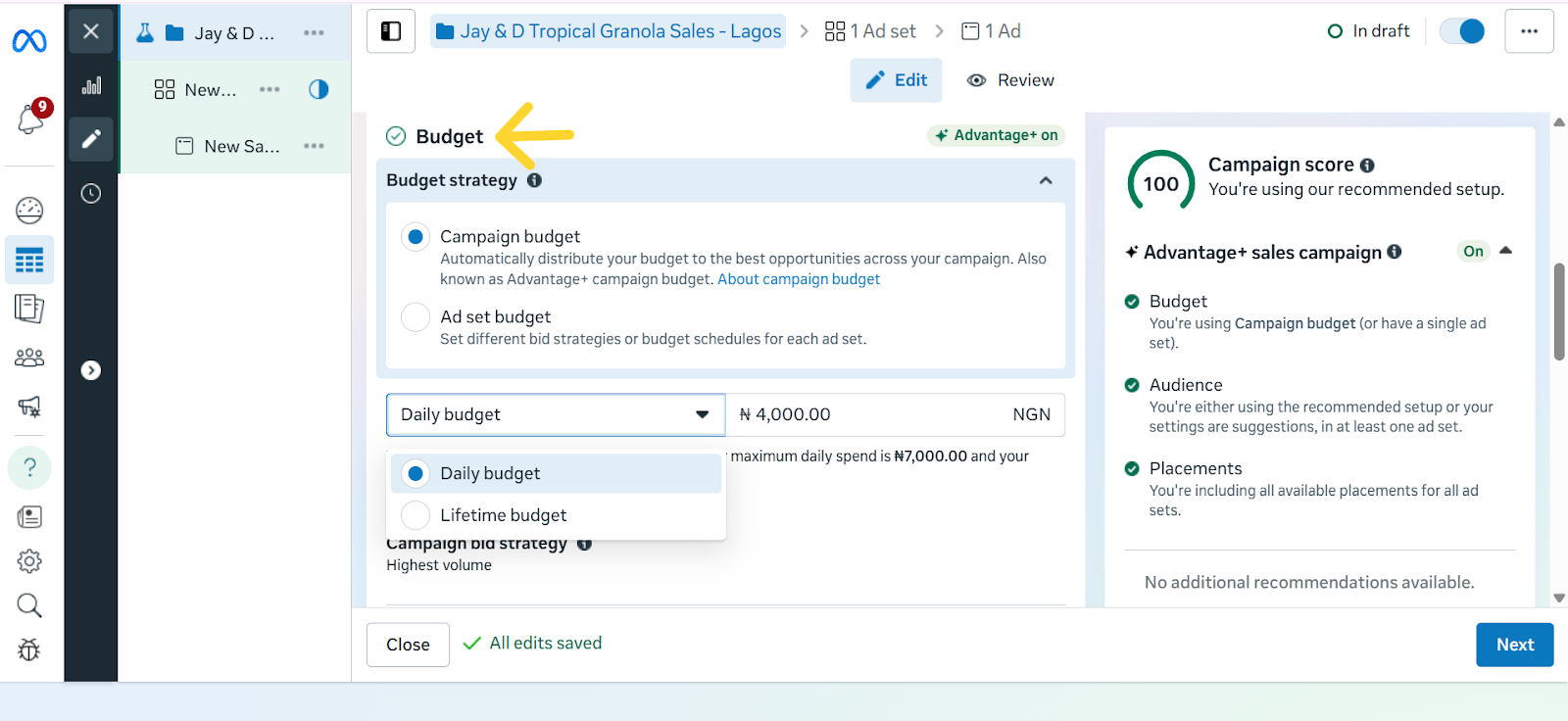
Screenshot of Meta Ads Manager showing the Budgets section, including campaign budget and ad set budget, with daily and lifetime budget options visible. An arrow points to the ‘Budgets’ heading at the top of the section.

Your budget decides how much you want to spend on your ads, while your schedule controls when your ads run. In Meta Ads Manager, you’ll see two main types of budgets:

  1. Daily budget – This is how much you want to spend per day. For example, setting ₦2,500/day for 7 days means Meta will try to spend around ₦2,500 each day while getting you the best results possible.
  2. Lifetime budget – This is the total amount you want to spend over the entire campaign. For example, if you set a lifetime budget of ₦15,000 for 7 days, Meta will spread that amount across the week, sometimes spending more on one day and less on another, depending on performance.

Pro-tips for Cost Control:

  • Set a bid cap – A bid cap lets you tell Meta the maximum amount you’re willing to pay for a result (like a click or a lead). This ensures you don’t waste money on overly expensive results.
  • Start small, then increase – Begin with a modest daily spend and raise it only if the ad is performing well.
  • Use a clear schedule – Don’t run ads endlessly. Set start and end dates so your budget doesn’t drain without you noticing.
  • Take Advantage of the Cost per Result Goal Setting - This setting tells Meta the maximum you’re willing to pay for the outcome you want. For example, if your goal is sales, you could set a limit like “Don’t spend more than ₦1,000 to get one purchase.” If your goal is awareness, you might say, “Keep the cost of reaching 1,000 people under ₦500.”

This way, Meta runs your ads but won’t go beyond the budget you’ve set for each result, helping you stay in control of your spending.

The caveat here, however, is that if your target cost is set unrealistically low, Meta may struggle to deliver your ads, or you may get fewer results. So it’s best used when you already have some data on what a “reasonable” cost per result looks like for your business.

  • ROAS Goal (Return on Ad Spend) – This is a more advanced option. Instead of focusing on cost per action, you’re asking Meta to prioritise sales that give you a specific return. For example, if you set a ROAS goal of 3.0, you’re telling Meta, “Only spend my budget on people who are likely to generate at least ₦3,000 in sales for every ₦1,000 I spend.”

Note: This works best if you’ve set up the Meta Pixel or Conversions API so Meta can track actual purchases.

Together, these options help you avoid overspending and make sure your money is going toward results that matter most to your business.

Step 6: Choose Your Target Audience 

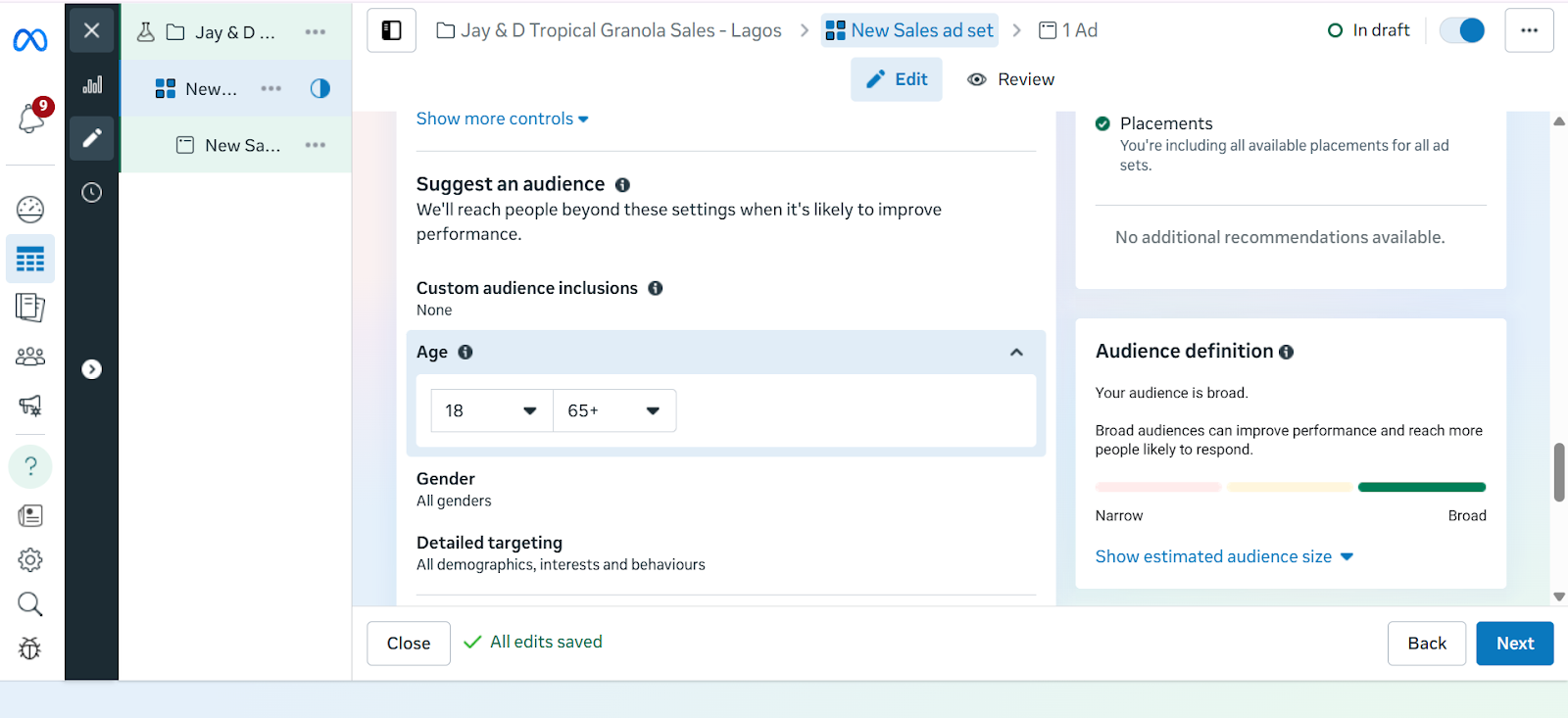
Screenshot of Meta Ads Manager showing the Audience Targeting section. The Custom Audience option is visible, along with manual targeting settings for age, gender, and detailed targeting.

This is where you tell Meta exactly who should see your ads. Instead of showing your ad to everyone, you can narrow it down to people who are most likely to buy from you. 

With Meta Ads Manager, you have three main options:

  1. Core Audiences – With core audiences, you set the filters yourself. This means you tell Meta exactly the kind of people you want your ad to reach. Instead of showing your ad to just anyone, you narrow it down based on details such as age, gender, location, language, or interests. 
  2. Custom Audiences – Custom audiences let you reach people who already have a connection with your business. This could be past customers whose emails you upload into Meta Ads Manager, visitors who came to your website but didn’t complete a purchase, or even people who interacted with your Instagram or Facebook content. Instead of starting fresh with strangers, you’re reminding people who already know your brand to come back and take the next step, which usually makes them easier to convert.
  3. Lookalike Audiences – Once you have a Custom Audience, Meta can find new people who share similar traits. For example, if your best customers are young professionals in Lagos, Meta can look for more people just like them in Nigeria.

While targeting with Meta Ads Manager makes it easier to reach the right people, recent privacy changes, especially Apple’s iOS updates, have made it harder to track every action users take across apps and websites. This means targeting isn’t always perfect, but it still gives you a more direct connection to your audience. The key is to test different audience types and focus on the ones that deliver the best results for your business.

Step 7: Select Ad Placements

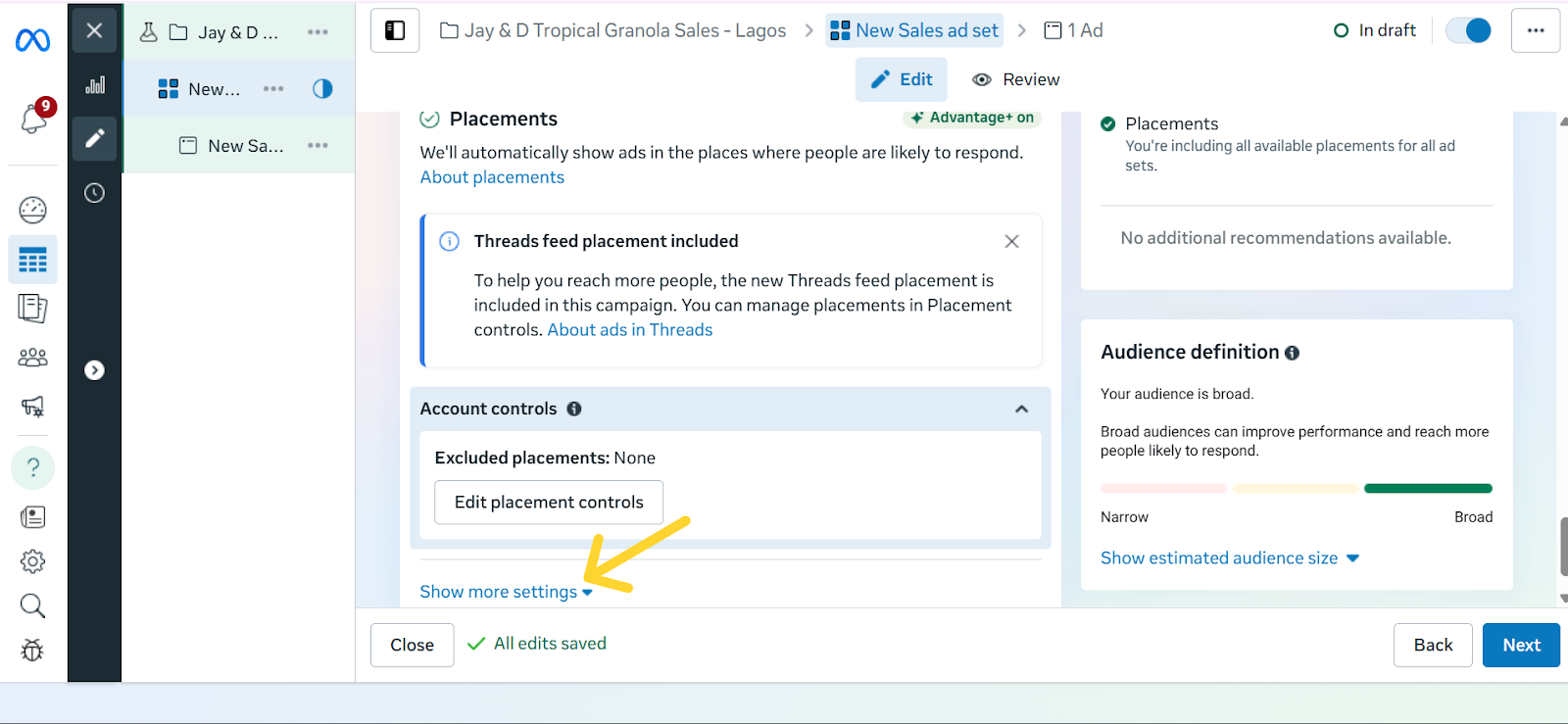
Placements are the different spots where your ad can show up across Meta’s platforms. This could be in the Facebook News Feed, Instagram Stories, Reels, Messenger, or even inside partner apps and websites. By default, Meta recommends Advantage+ Placements, which automatically shows your ad in multiple places and then prioritises the ones that perform best.

For beginners, this is often the easiest option because Meta does the testing for you. However, if you want more control, you can manually choose placements, for example, focusing only on Instagram Reels if your audience skews younger, or Messenger if you want a more personal approach.

Screenshot of the Ad Placements section in Meta Ads Manager with an arrow pointing at ‘Show More Settings’ for manually selection of ad placements.

Each placement has its strengths:

  • Feed: Ads appear in the main scrolling section of Facebook or Instagram and are great for longer captions, links, and detailed storytelling.
  • Stories: These are full-screen, vertical ads that stay up for 24 hours. They work best for quick, eye-catching visuals because they blend naturally into how people already swipe through Stories.
  • Reels: These ads appear as short-form video content when people scroll from one Reel to the next on Instagram or Facebook. They look and feel like regular Reels, except they’re sponsored, so they blend naturally into the viewing experience. This makes them a good way to reach people while they’re actively browsing short videos and open to discovering something new.
  • Messenger: Ads placed in the Messenger app, where conversations happen. Best suited for businesses that want a more personal approach or direct engagement.

The real advantage of placements is flexibility: you can either let Meta spread your ad widely and optimise for results, or zero in on the exact spots where your audience is most active.

Step 8: Design Your Facebook Ad Creative

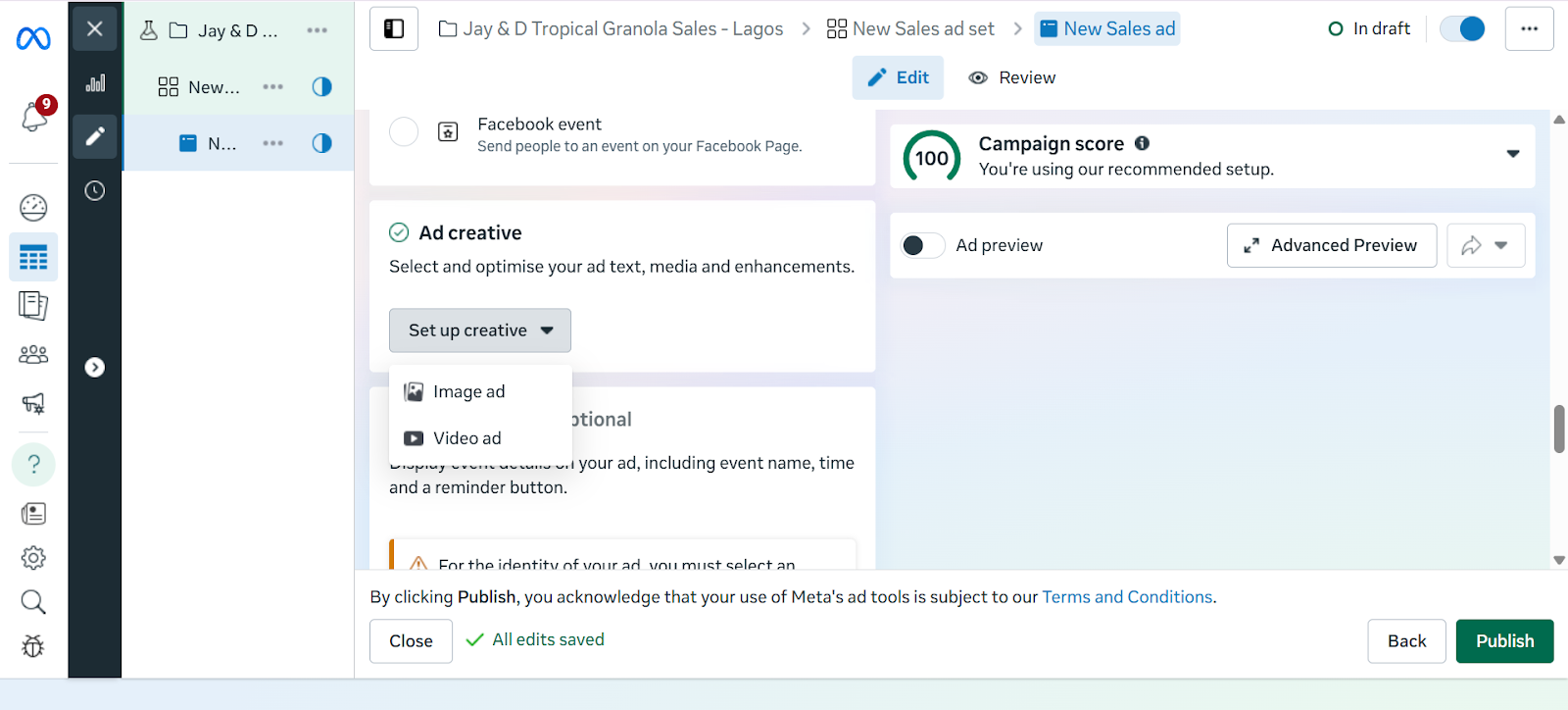
Screenshot of the ad creative setup screen in Meta Ads Manager,with the "Set up Creative" option toggled down, showing fields for image and video ads.

An ad creative, simply put, is the actual content of your ad. That is, the picture, video, headline, and caption people will see when your ad shows up on their Facebook or Instagram feed. A strong creative can be the difference between someone scrolling past or stopping to pay attention.

To make yours effective, let’s break it down into the key parts so you know exactly what to focus on.

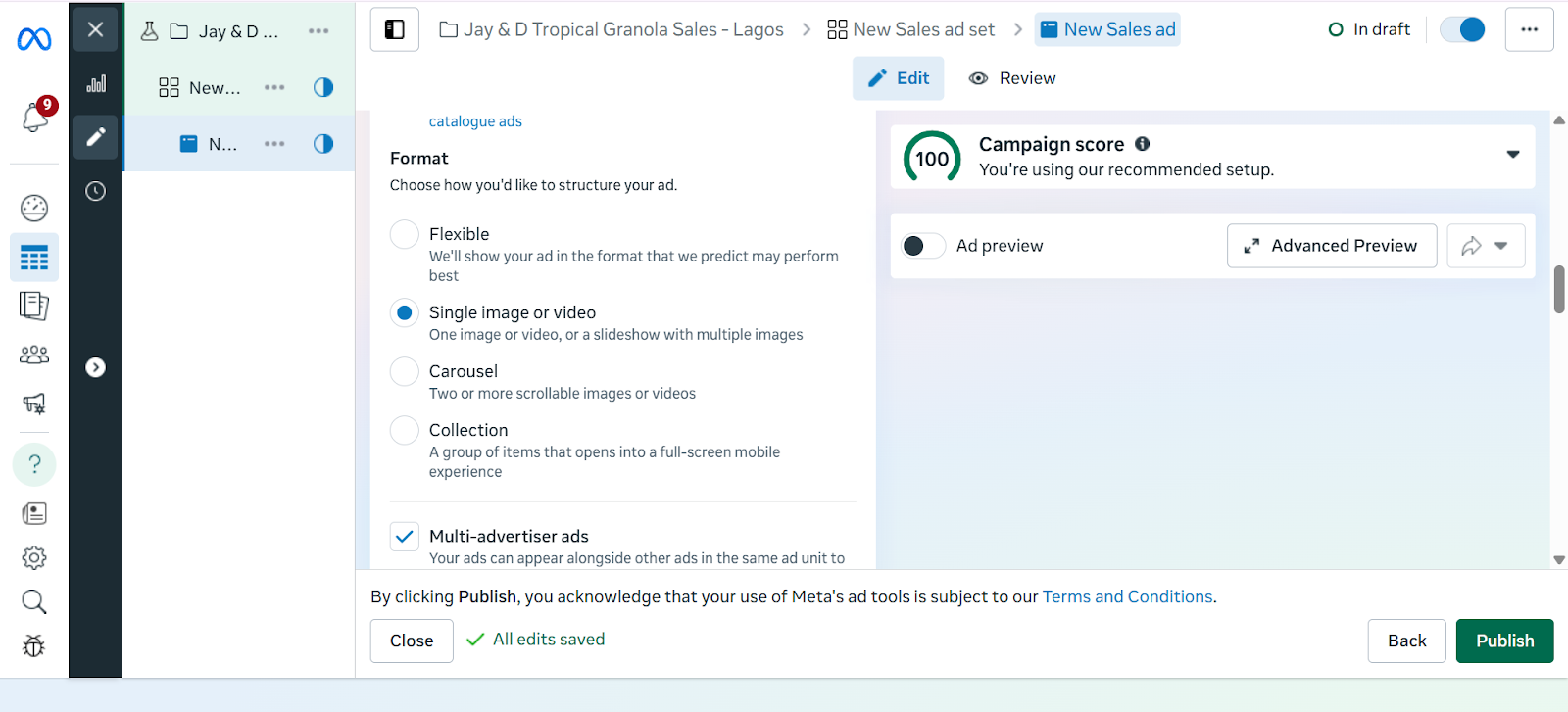
Select Ad Format

  • Single Image – Great for a single product.
  • Video – Best for demos or storytelling.
  • Carousel – Multiple images, perfect for bundles or multiple products.
Screenshot illustrating different ad creative formats in Meta Ads Manager, including single image, video, and carousel options.

Visuals

  • Use high-quality images or videos.
  • Showcase the product clearly (e.g., mockups of your eBook, a demo of your software).

Copywriting Tips

  • Primary Text: Keep it short, benefit-driven, and engaging.
  • Headline: Bold and attention-grabbing.
  • Description: Extra context if needed.

Call-to-Action (CTA)

  • Examples: “Shop Now,” “Download,” “Get Started,” “Learn More.”
  • Always link directly to your product page or sales funnel.

 Best Practices for High-Performing Facebook Ad Creatives

  • Use bold visuals: Bright colours, high contrast, and eye-catching images or videos grab attention quickly.
  • Keep it short: Captions should be concise and to the point. Aim for one clear message.
  • Add a clear CTA (Call-to-Action): Examples include “Shop Now,” “Sign Up,” “Learn More.” Don’t assume people will know what to do.
  • Follow the 20% text rule: Facebook performs best when text on your image is minimal — less than 20% of the total space.
  • Match creative to your goal: If you’re selling, show the product in use. If you’re building awareness, focus on brand storytelling.

Step 9: Review and  Publish

Before you hit “Publish,” it’s important to double-check your ad. Meta has strict ad policies, and if your ad doesn’t follow the rules, it can be rejected or even get your account flagged.

Things to check before publishing:

  • Ad content: Avoid misleading claims, exaggerated promises, or offensive language.
  • Images and videos: Don’t use shocking visuals or content that suggests unrealistic results.
  • Targeting: Make sure your audience choices don’t discriminate based on personal traits like race, religion, or health conditions.
  • Links: Test that your link works and takes people exactly where you promise in the ad.

Common reasons ads get rejected:

  • Promoting restricted or illegal items 
  • Adult content 
  • Poor landing pages

Once everything looks good, click Publish. Meta will then review your ad, which usually takes a few minutes to 24 hours. If approved, your ad will go live and start delivering to your chosen audience.

Step  10: Monitor & Optimise Performance

In Ads Manager, track key metrics to understand how your campaigns are performing:

  • Click Through Rate (CTR): This measures the percentage of people who saw your ad and actually clicked on it. A higher CTR usually means your ad copy, creative, or targeting is resonating with your audience.
  • Cost Per Click (CPC): This tells you how much you are paying on average for each click on your ad. Lower CPC means you are driving traffic more cost-effectively.
  • Conversions and Sales: This tracks how many people took a desired action after clicking your ad, such as signing up, purchasing, or downloading. It shows the real business impact of your campaigns.
  • Return on Ad Spend (ROAS): Compares how much money you made from your ads versus how much you spent. If you spent ₦10,000 and earned ₦40,000 in sales, your ROAS is 4x.

Optimize Ads

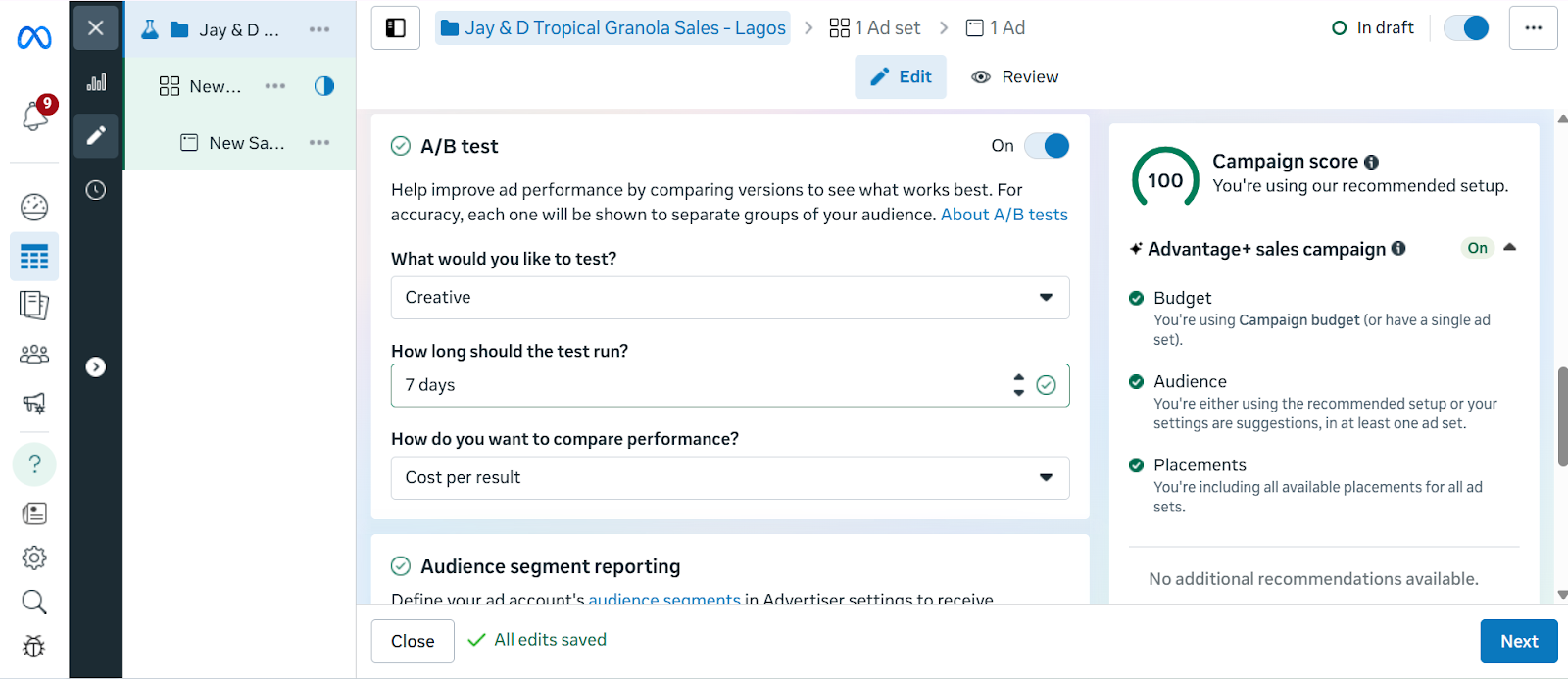
  • Test different versions of your ad (A/B testing): Try running two or more versions of the same ad with slight differences. For example, a different image, headline, or CTA. This helps you figure out what your audience responds to best.
Screenshot of the A/B Testing section in Meta Ads Manager showing the three setup questions: "What would you like to test?" "How many days would you like it to run?" and "How would you like to compare performance?"
  • Adjust your audience if results are weak.
  • Increase budget on winning ads, pause underperforming ones.

Running Facebook ads in 2025 is only part of the journey. Turning clicks into sales or meaningful engagement requires the right destination for your audience. With Mainstack, you can create tailored landing pages or online storefronts that act as the perfect extension of your ad campaigns. Every click from your Facebook ad can lead to pages specifically designed to showcase your products, collect leads, or drive purchases directly. 

By pairing the precise targeting of Facebook Ads with Mainstack’s easy-to-use tools, you create a system where ads, pages, and customer actions work together, making it easier to track results, optimise campaigns, and grow your business efficiently.

Start building pages that connect directly to your ads today and see how a well-designed destination can turn impressions into measurable growth.

Facebook Ads Campaign Checklist

At this point, you’ve learned how to set up, target, and create effective Facebook ads and how to ensure every click leads to a page that converts impressions to sales. But, to make it even easier, we’ve put together a step-by-step checklist you can follow every time you run a campaign.

Step 1: Set Up Meta Business & Ads Manager

Step 2: Create Your Campaign in Ads Manager

Step 3: Choose Your Objective

Step 4: Name Your Campaign

Step 5: Set Your Budget & Schedule

Step 6: Choose Your Target Audience 

Step 7: Select Ad Placements

Step 8: Design Your Facebook Ad Creative

Step 9: Review and Publish

Step 10: Monitor & Optimise Performance

How-Tos
How to Protect Yourself From Identity Theft Online
Protect your data with smart online security tips. Learn how to avoid identity theft, stop phishing, and secure your online accounts easily.
Mainstack Editorial Team
September 24, 2025
10 min read
Read more
Button ArrowButton Arrow

Every day, thousands of people wake up to find their digital identity hijacked. It could be a hacker guessing a weak password, a fake social media account impersonating you, or a scammer using your email to trick your friends. Identity theft has moved from just stolen credit cards to stolen reputations, fake profiles, and access to your most private data. 

Criminals scrape photos, posts, and personal details from the internet to build convincing profiles, then use them to open new accounts, drain funds, or blackmail victims. The more we live online, the larger the digital footprint we leave behind and the more attractive we are to cybercriminals. Online safety is now a core part of everyday survival. In this guide, you’ll discover proven ways to secure your accounts, limit your exposure, and outsmart identity thieves before they strike.

Understanding Online Identity Theft

Online identity theft happens when cybercriminals steal personal information such as names, addresses, phone numbers, credit card details, or Social Security numbers to impersonate victims or commit fraud. Unlike traditional identity theft which might involve stolen wallets or intercepted mail, the digital version exploits the vast amounts of personal data we store and share online.

How Attackers Steal Your Identity

A hacker dressed in a hoodie

Attackers use a range of tactics, including:

  • Phishing and Smishing: Fake emails or text messages trick you into revealing sensitive data or login credentials.
  • Data Breaches: Large-scale hacks of companies, banks, or platforms expose millions of customer records.
  • Social Media Impersonation: Fraudsters create look-alike profiles to scam friends or followers.
  • Malware and Keyloggers: Hidden software records keystrokes, capturing passwords and credit card numbers.
  • Public Wi-Fi Snooping: Unsecured networks allow hackers to intercept traffic and steal credentials.

Your personal data is valuable on the dark web. Stolen information can be used to:

  • Open new credit lines.
  • File fake tax returns.
  • Commit medical identity theft.
  • Damage your reputation online.

Identity theft can drain both time and money, forcing victims to spend weeks or even months disputing charges, closing accounts, and repairing credit. Beyond direct financial losses, you may also face costs for legal help, credit monitoring, and lost productivity while resolving the damage.

Practical Ways to Protecting Yourself Online.

1. Strengthen and Lock Down Your Accounts

  • Create Strong, Unique Passwords: Use passwords of at least 12 characters with a mix of uppercase, lowercase, numbers, and symbols. Never reuse passwords across accounts.
  • Use a Password Manager: Apps like 1Password, Bitwarden, or LastPass can generate and securely store complex passwords
  • Enable Multi-Factor Authentication (MFA): MFA adds an extra layer of protection, requiring a code or biometric scan in addition to your password.
  • Set Up Security Alerts: Many banks, email providers, and social platforms let you turn on suspicious login notifications. So, don’t skip them.

2. Secure Your Devices Before Hackers Do

  • Keep Your Software Updated: Regular updates patch vulnerabilities that hackers exploit.
  • Install Security Software: Use reputable antivirus, anti-spyware, and firewall apps on all your devices.
  • Encrypt Sensitive Data: Use device encryption (built into iOS, Android, and most computers) to make stolen data unreadable.
  • Lock Your Devices: Use biometric locks (Face ID or fingerprint) or a strong passcode.

3. Stop Feeding Identity Thieves on Social Media

  • Limit Personal Info: Avoid posting your date of birth, address, travel plans, or other private details that criminals can use for scams or security questions.
  • Beware of Fake Profiles: Scammers create convincing copies of real profiles to impersonate people and request money or information. Search your name periodically to see if someone is copying you.

  • Use Privacy Settings: On Facebook, Instagram, TikTok, and LinkedIn, restrict who can see your posts and personal info.

4. Think Before You Click: Links Can Be Traps

  • Pause Before Opening Links: If you get a link via email, text, or direct message and you’re not 100% sure it’s legit, don’t click it.
  • Hover to Preview URLs: On desktops, hover over links to see where they lead before clicking. On mobile, press and hold to preview.
  • Watch for Phishing Tactics: Fake “security” alerts or offers too good to be true often contain malware or credential-stealing pages.
  • Type URLs Directly: Instead of clicking links to banks or payment services, type the address manually into your browser.

5. Monitor Your Finances and Online Reputation

A woman checking her credit card details
  • Check Bank and Credit Card Statements Weekly: Early detection stops damage before it spirals.
  • Freeze Your Credit: In many countries you can freeze your credit file, preventing new accounts from being opened in your name.
  • Check Your Credit Report: Look for unfamiliar accounts or inquiries.
  • Set Up Alerts: Many financial apps let you receive instant transaction alerts to catch fraud fast.

6. Protect Critical Personal Data

  • Use a Separate Email for Banking: Create a dedicated email address only for financial accounts.
  • Give Nonsense Answers to Security Questions: Don’t use real answers like your pet’s name, use random phrases only you know.
  • Create an Online Social Security/Tax Account (if applicable): Lock in your profile before a thief does to prevent fraudulent filings.
  • Be Aware of Mail Theft: Criminals can file change-of-address forms to intercept mail. Confirm your mailing address regularly with your local postal service.

7. Stay Safe on Public Networks

  • Avoid Sensitive Transactions on Public Wi-Fi: Use mobile data or a reputable VPN instead.
  • Turn Off Auto-Connect: Prevent your device from automatically joining unknown networks.
  • Use Secure Hotspots: If you must use Wi-Fi, choose networks with a password and look for “https” in the browser.

8. Regularly Audit and Reduce Your Digital Footprint

  • Delete Unused Accounts: Old accounts can be weak spots. Delete or deactivate what you no longer use.
  • Opt Out of Data Brokers: Request removal from people-search sites like Whitepages or Spokeo.
  • Search Yourself: Google your name, emails, and usernames regularly to see what’s public.

9. Build a Long-Term Identity Protection Habit

  • Keep Backups: Regularly back up your important files to an external drive or secure cloud storage.
  • Teach Family Members: Make sure kids and older relatives also know about phishing, privacy, and strong passwords.
  • Stay Informed: Follow cybersecurity news or subscribe to security alerts from your bank or government agencies.

What once felt like a distant risk is now an everyday reality. Criminals are sophisticated, patient, and often invisible until the damage is done. Fortunately, you can build strong walls around your digital life with just a few consistent habits. By strengthening your passwords, enabling multi-factor authentication, locking down your devices, being skeptical of unsolicited requests, and resisting the urge to click every link you see, you significantly reduce your risk. Monitoring your financial accounts, limiting what you share online, and cleaning up your digital footprint give you extra layers of protection. Think of these steps as digital hygiene: small, regular actions that keep you safe and in control.