Blog Hero  Image

ChekoutAI: Mainstack's Revolutionary Feature that Boosts Sales and Revenue

Author Image
Mainstack Editorial Team
August 5, 2025
10 min read

Our latest feature update introduces game-changing features that redefine the online shopping experience for both online entrepreneurs who use our platform and their customers.

Let’s delve into the details of two standout features that set our platform apart from the rest.

Checkout AI

Imagine embedding a checkout widget, or popup on your website with just a line of code, or generating a quick checkout link in seconds, streamlining the payment process for your customers.

Meet Checkout AI, the 3-in-one feature that helps online entrepreneurs using our platform offer a convenient way for their customers to finalize purchases with ease.

Checkout AI is divided into 3 parts:
 

__Checkout Link.png

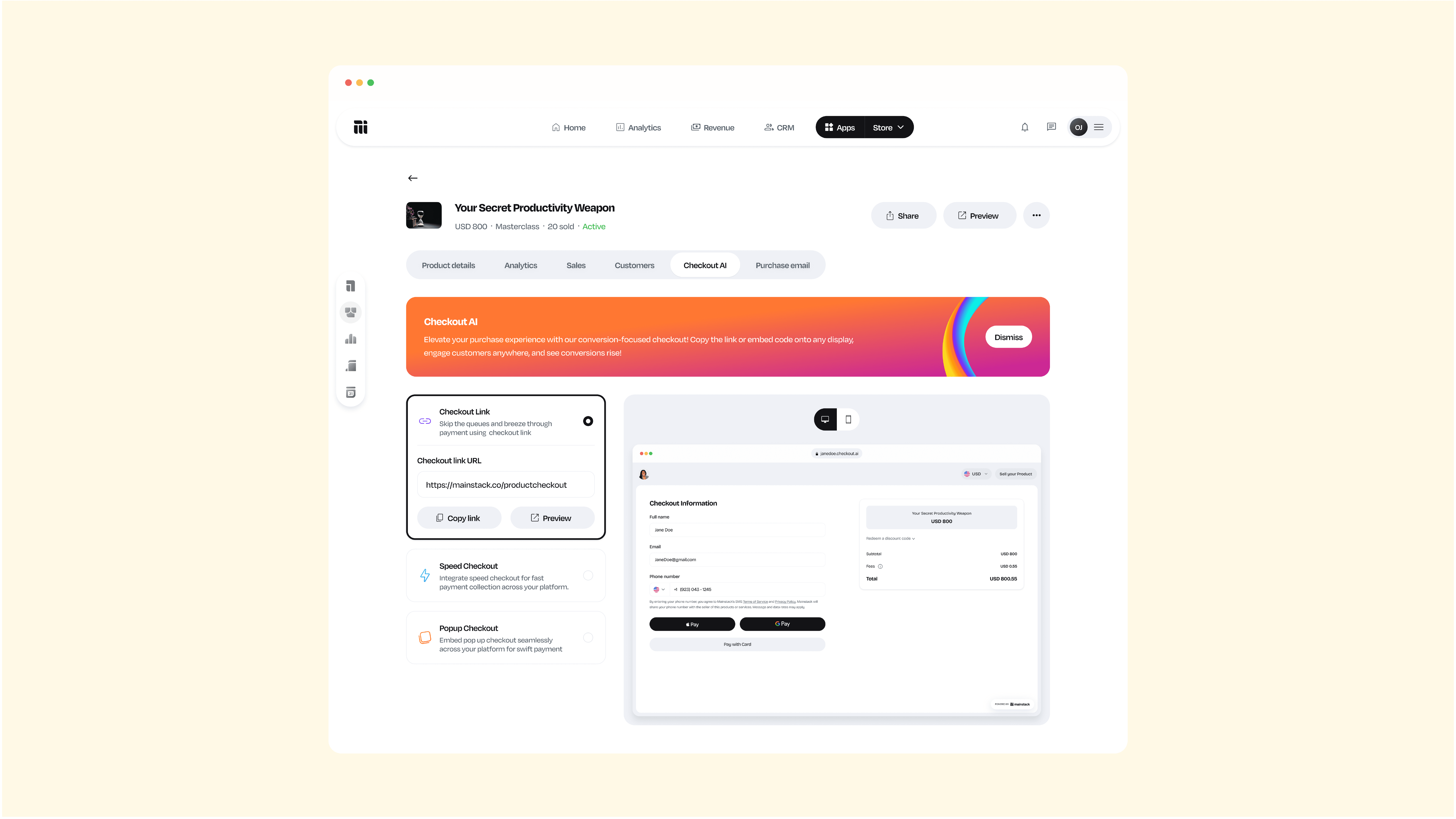
Checkout link: With this you can swiftly generate links that lead customers directly to the checkout page, eliminating unnecessary steps and reducing friction in the purchasing journey. You can embed the link in an email, social media post, or any other communication channel.


__Speed Checkout.png


Speed Checkout: With a single line of code you can easily embed payment widgets to your website to help your customers pay you faster.
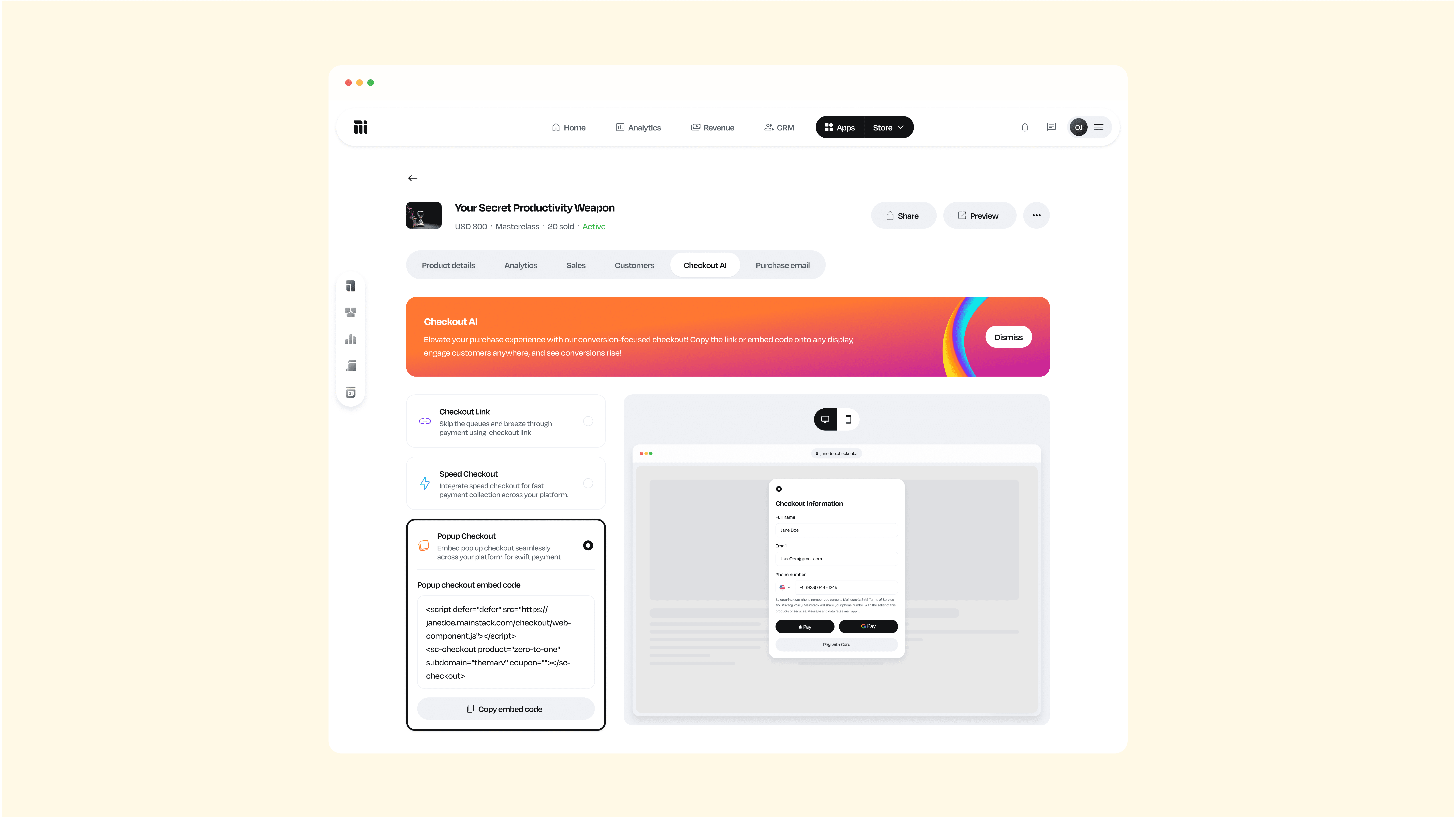
 

__Popup Checkout.png

Pop-up Checkout: Just as the name says, this is similar to speed checkout, but instead of a widget, this comes as a popup when your customers perform certain actions on your website.

With this feature, you can enhance your website checkout process, in a matter of seconds ensuring a swift and hassle-free transaction experience for your customers.

Google and Apple Pay Integrations


__Google Pay Apple Pay.png

Recognizing the importance of diverse payment methods, our platform now seamlessly integrates with Google Pay and Apple Pay.

These integrations bring a new level of convenience to the checkout process, as customers can now make payments using their preferred digital wallets.

By incorporating these widely used platforms, we aim to provide a secure and user-friendly payment experience.

This enhancement not only caters to the tech-savvy consumer but also positions the online entrepreneurs using our platform at the forefront of digital payment trends.

Our new software updates show how much we’re into bringing fresh stuff to digital creators.

The combination of Checkout AI and the integration of Google and Apple Pay reflects our dedication to simplifying transactions and enhancing the overall shopping journey while equipping our creators and entrepreneurs with the tools needed to thrive.

Try out these new features and don’t forget to drop some product feedback in the comments, we take your experience and feedback seriously so we can better serve you.

Our latest feature update introduces game-changing features that redefine the online shopping experience for both online entrepreneurs who use our platform and their customers.

Let’s delve into the details of two standout features that set our platform apart from the rest.

Checkout AI

Imagine embedding a checkout widget, or popup on your website with just a line of code, or generating a quick checkout link in seconds, streamlining the payment process for your customers.

Meet Checkout AI, the 3-in-one feature that helps online entrepreneurs using our platform offer a convenient way for their customers to finalize purchases with ease.

Checkout AI is divided into 3 parts:


__Checkout Link.png

Checkout link: With this you can swiftly generate links that lead customers directly to the checkout page, eliminating unnecessary steps and reducing friction in the purchasing journey. You can embed the link in an email, social media post, or any other communication channel.


__Speed Checkout.png


Speed Checkout: With a single line of code you can easily embed payment widgets to your website to help your customers pay you faster.


__Popup Checkout.png

Pop-up Checkout: Just as the name says, this is similar to speed checkout, but instead of a widget, this comes as a popup when your customers perform certain actions on your website.

With this feature, you can enhance your website checkout process, in a matter of seconds ensuring a swift and hassle-free transaction experience for your customers.

Google and Apple Pay Integrations


__Google Pay Apple Pay.png

Recognizing the importance of diverse payment methods, our platform now seamlessly integrates with Google Pay and Apple Pay.

These integrations bring a new level of convenience to the checkout process, as customers can now make payments using their preferred digital wallets.

By incorporating these widely used platforms, we aim to provide a secure and user-friendly payment experience.

This enhancement not only caters to the tech-savvy consumer but also positions the online entrepreneurs using our platform at the forefront of digital payment trends.

Our new software updates show how much we’re into bringing fresh stuff to digital creators.

The combination of Checkout AI and the integration of Google and Apple Pay reflects our dedication to simplifying transactions and enhancing the overall shopping journey while equipping our creators and entrepreneurs with the tools needed to thrive.

Try out these new features and don’t forget to drop some product feedback in the comments, we take your experience and feedback seriously so we can better serve you.

Sources used:
Sources last checked on date:
August 5, 2025

Make money online selling what you know. Mainstack makes it easy for you to showcase and get paid.

Find out more
Related Articles
Product Updates
New Feature Launch: You Can Enable Pre-orders for Hosted Courses on Mainstack
Start selling your course before it’s finished. Mainstack Pre-Orders let you validate demand, earn early revenue, and build hype before launch.
Mainstack Editorial Team
July 6, 2026
10 min read
Read more
Button ArrowButton Arrow

Every successful course starts with a great idea and hours of valuable research. 

But until now, if your course wasn’t fully finished, you couldn’t officially launch it, list it, or start selling.

That changes today.

We understand that waiting until every single video is shot and every workbook is perfected limits your momentum. That’s why we’re excited to introduce pre-order for Hosted Courses on Mainstack.

With this new feature, you can now accept payments for your course before it officially launches, validate demand, and start building excitement early.

Why Pre-Orders Matter for Mainstack Creators

With Pre-Orders on Mainstack, you can sell your course idea before it’s fully ready, giving you both validation and cash flow upfront.

Here’s what you can now do:

  • Validate demand early: List your course and confirm real interest from your audience before you finish creating it.
  • Earn while you build: Generate early sales to fund production, promotion, or upgrades.
  • Build anticipation: Turn your audience’s curiosity into a growing waitlist and early sign-ups.
  • Grow your community: Capture leads and nurture them before launch day.
  • Launch with confidence: Go live knowing you already have paying students and proof your course works.

Pre-Orders turn your next idea into income long before you hit “publish.”

How to Enable the Pre-Order Feature on Hosted Courses.

Setting up pre-orders for your course takes just a few minutes. Here’s how to start:

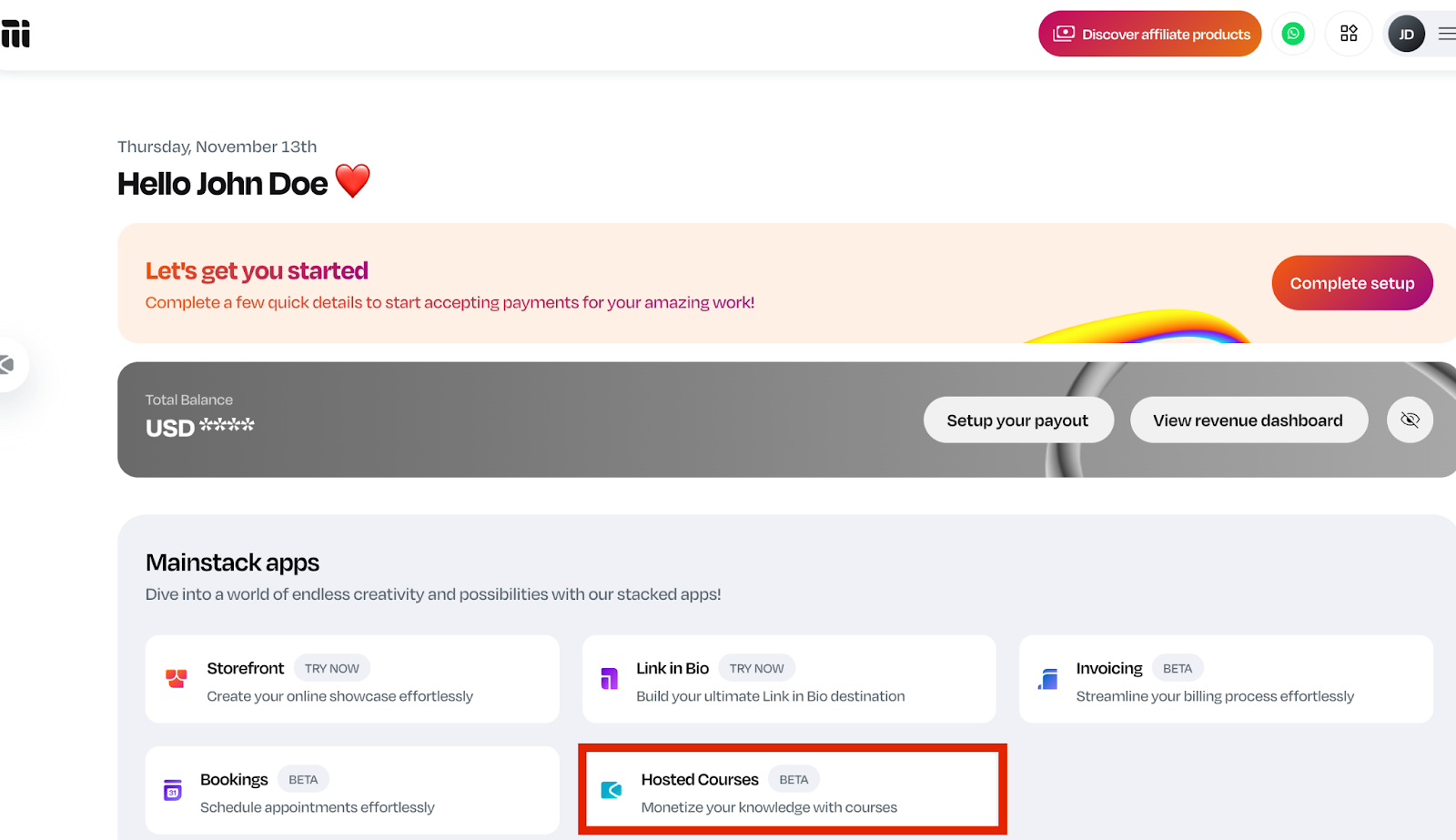
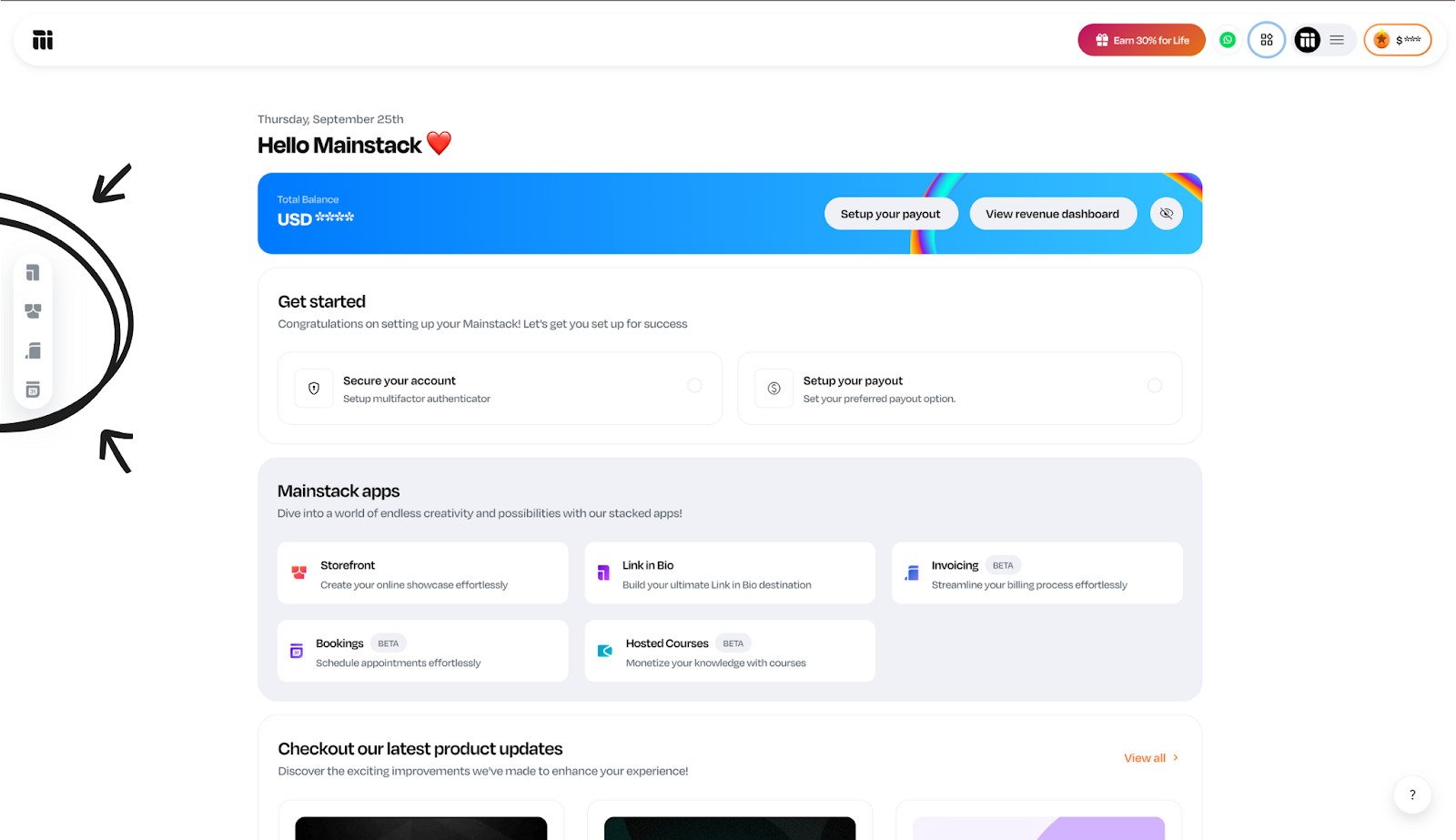
  1. Login to your Mainstack Dashboard and click Hosted Courses
Screenshot of Mainstack dashboard, highlighting the Hosted Courses App in colour red.
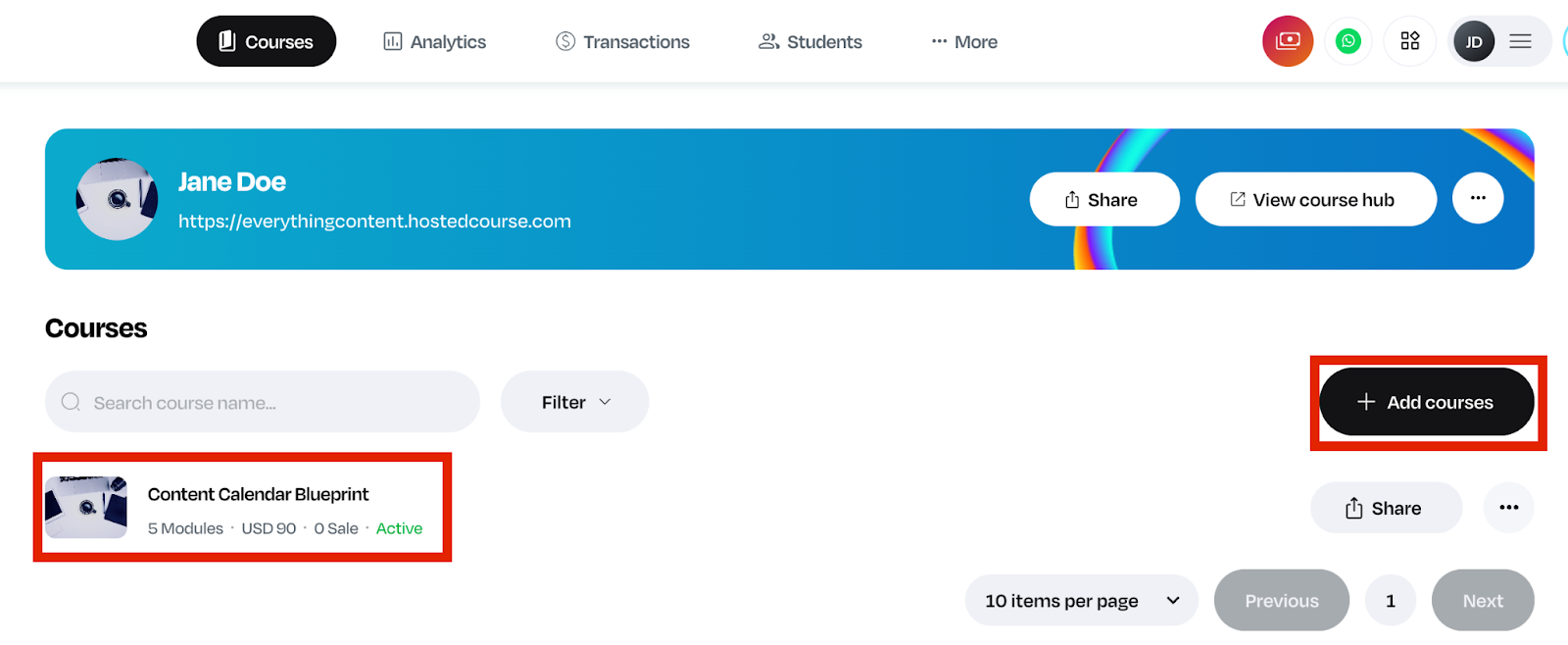
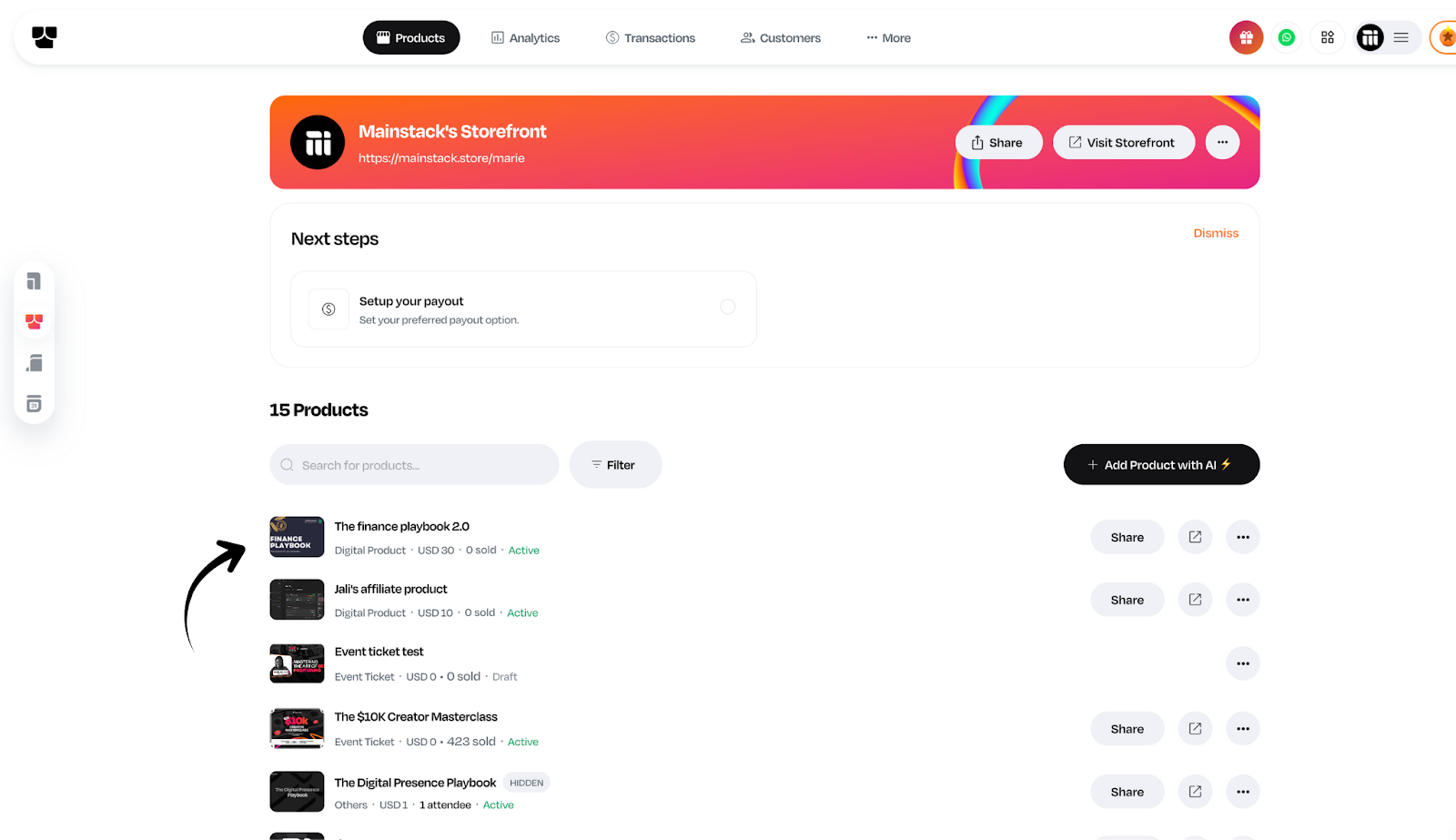
  1. Select the course you want to open for pre-order (or create a new one).
Screenshot of the Hosted Courses page, highlighting a course and the "add courses" button


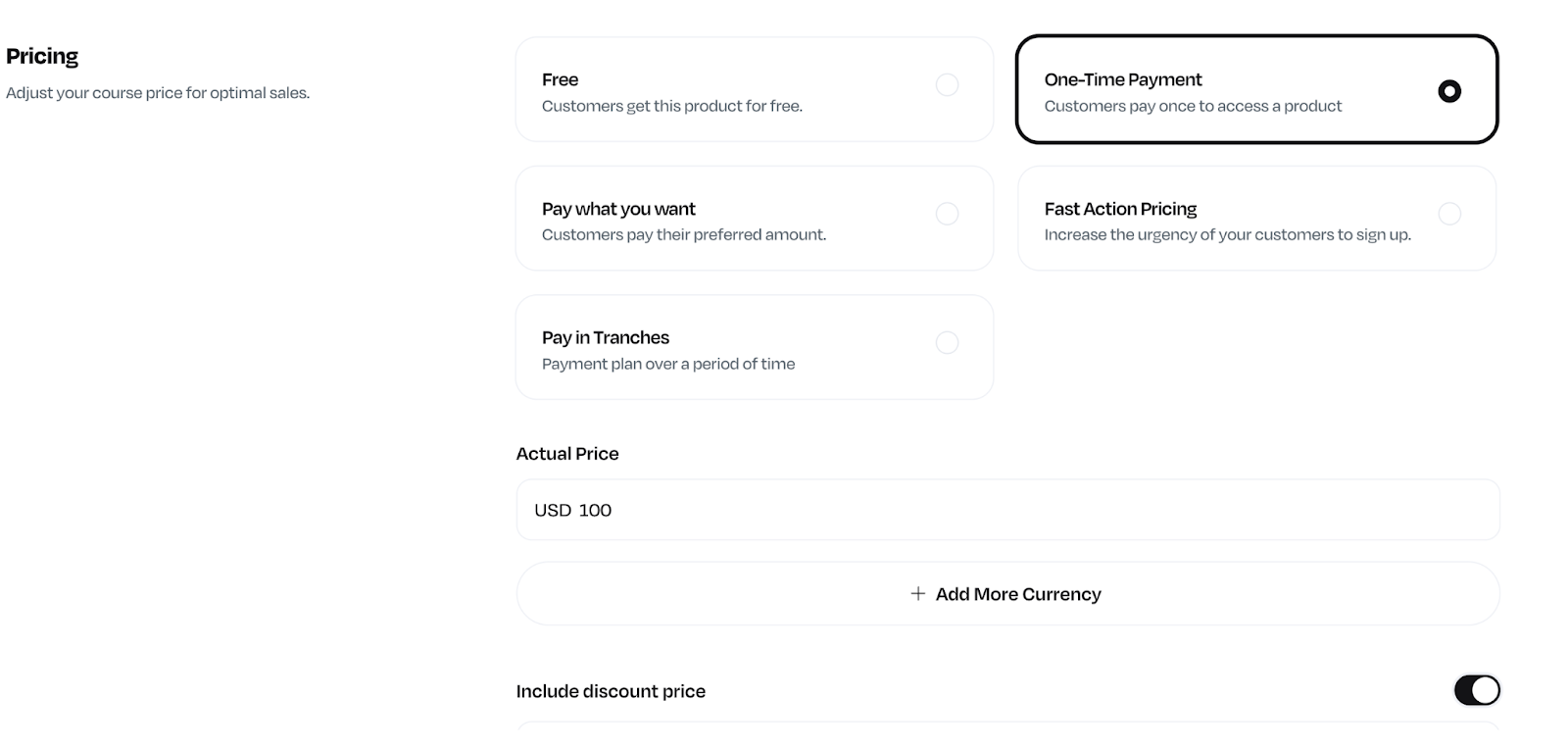
For an already existing course, click on the course and scroll down to pricing and additional details.

Screenshot of a Course page, showing the various pricing options.

NOTE: Pre-order for hosted courses only supports the one-time payment pricing plan.

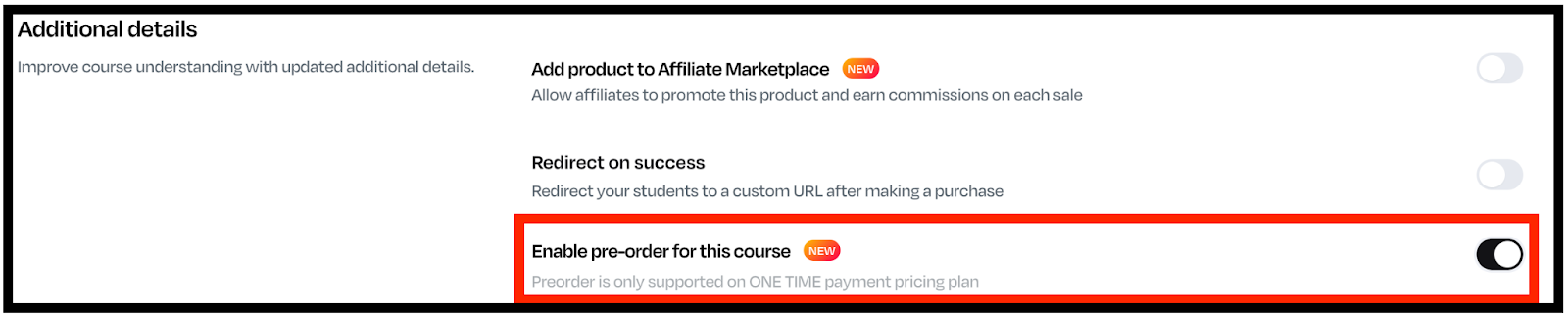
  1. Turn on the Pre-Order toggle under the “Additional” details section.
Screenshot of the additional details of a Course page, highlighting the pre-order toggle in red.
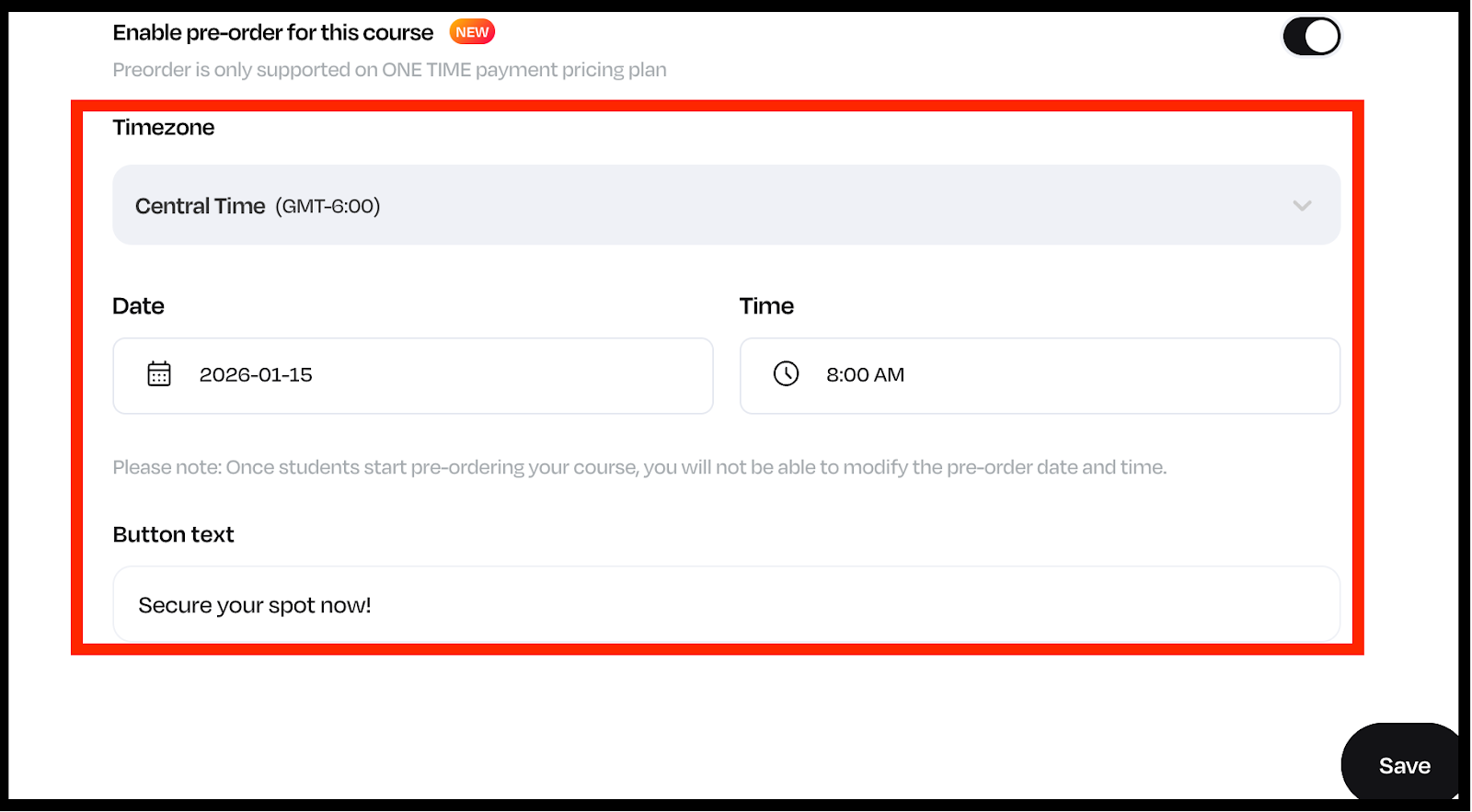
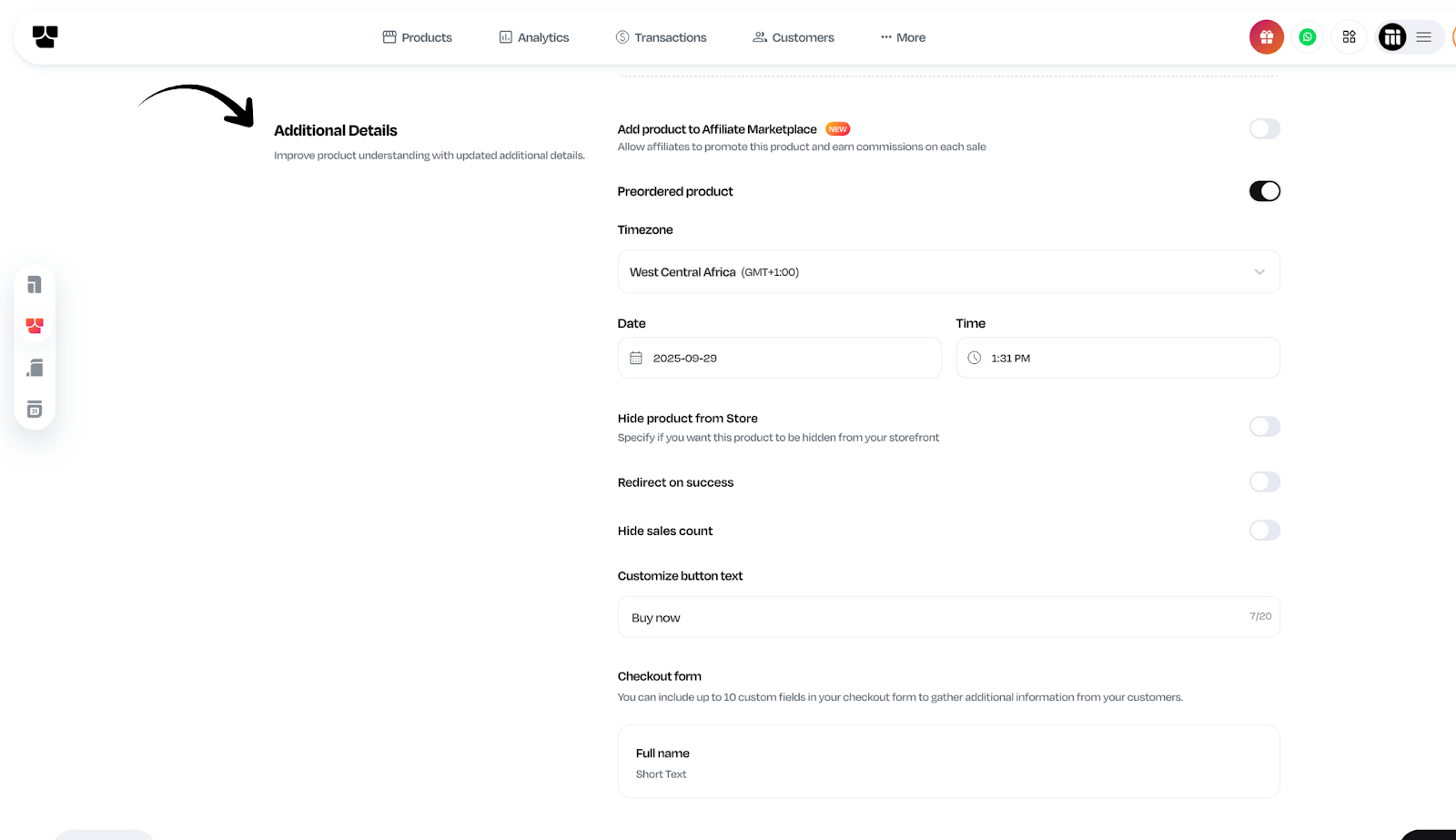
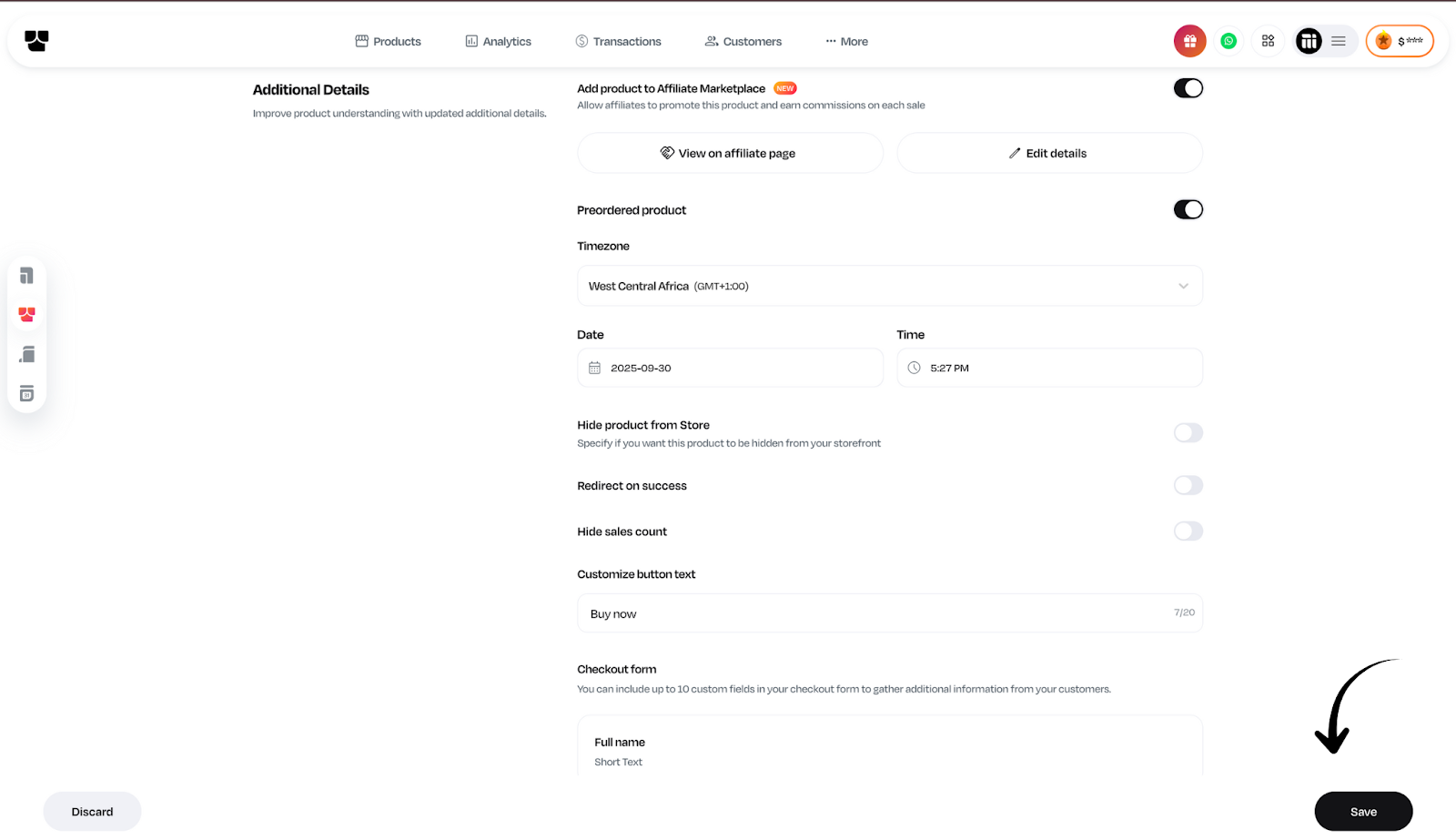
  1. Add timezone, release date, and an optional pre-order message on button text (like “Launches January 15 – Secure your spot now!”).
Screenshot of a Course page, showing the timezone, time, date and button text, highlighted
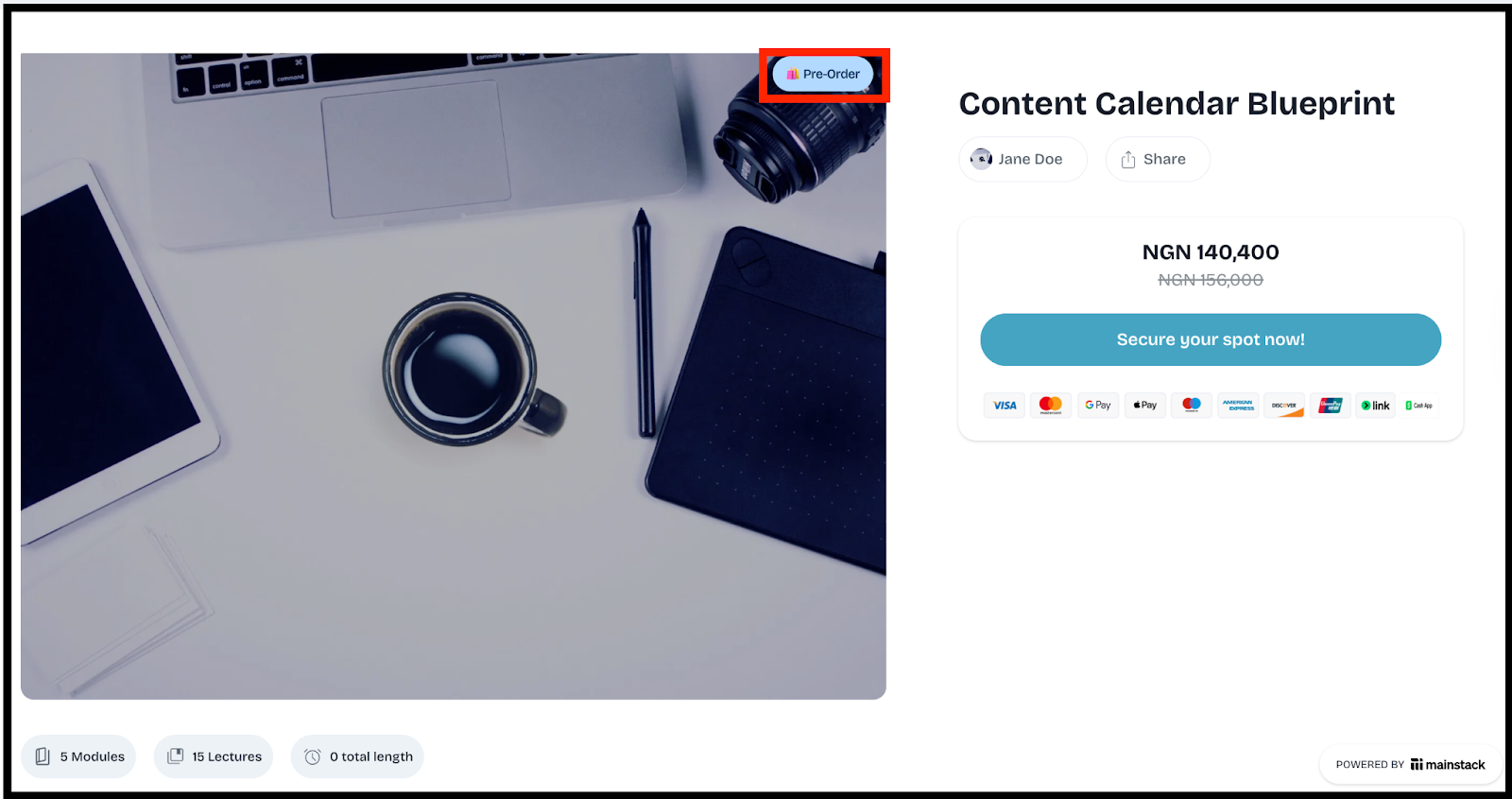
  1. Hit Save and your pre-order page is live. 
Screenshot of the live pre-order for hosted courses page.
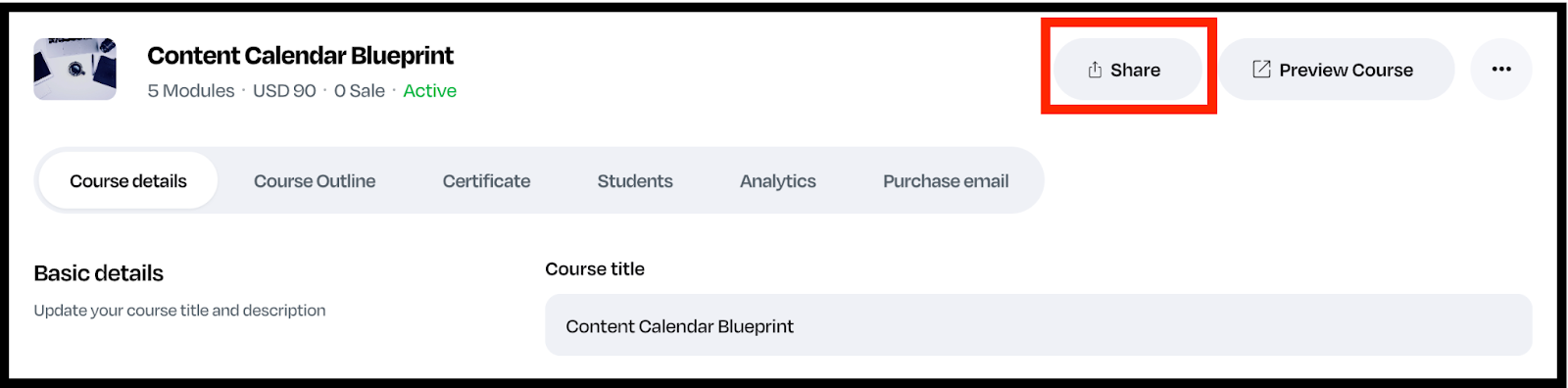
  1. Get your preorder course link and share it with your network!
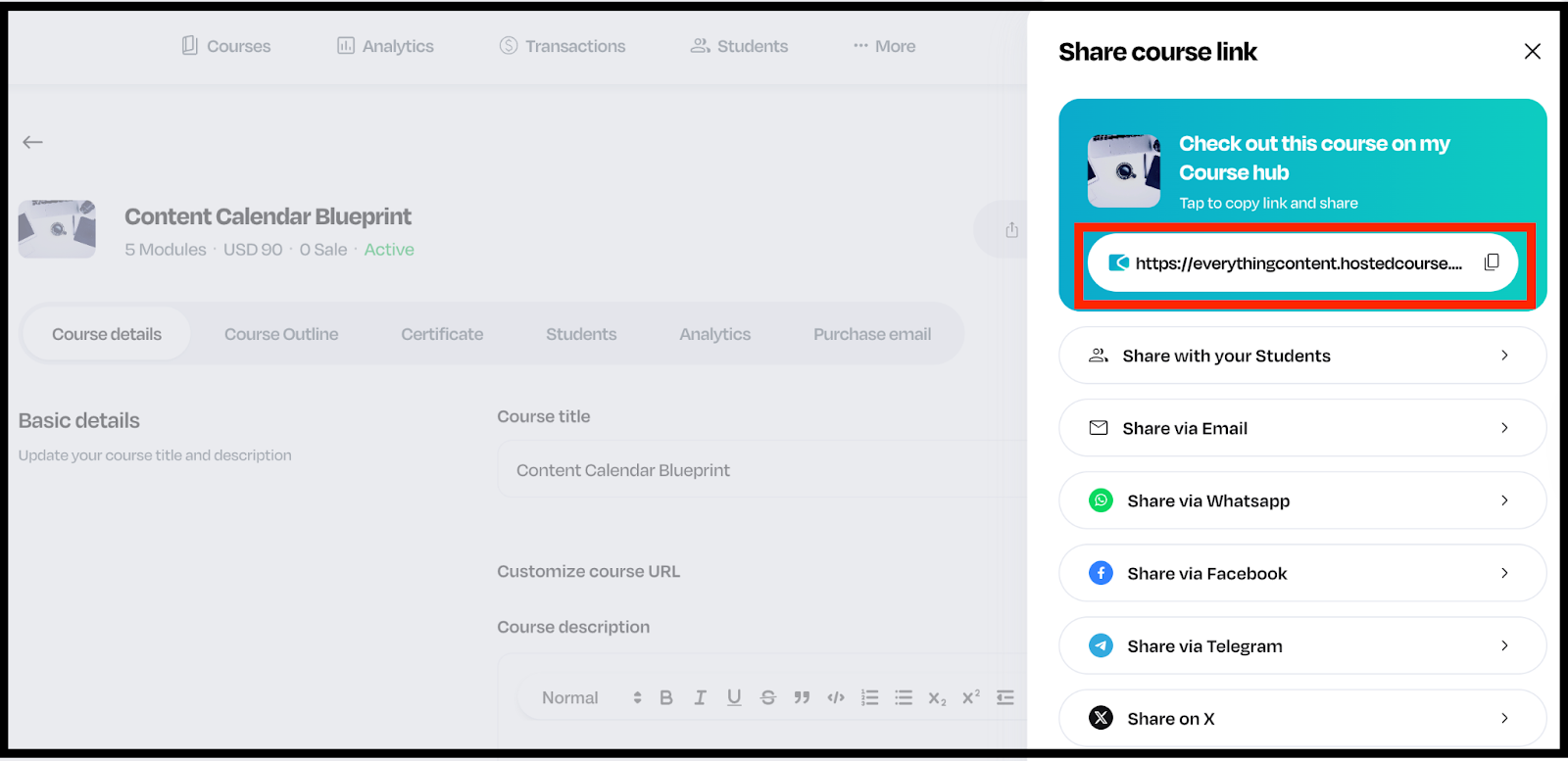
Screenshot of course details, highlighting the share button in red.
Screenshot of a Course details, highlighting the link to access the course in red

And just like that, you’re ready to start receiving payments upfront and focus on creating your masterpiece course. 

What You Can Do with Pre-Orders

With Pre-Orders on Mainstack, you can:

  • Sell your course before it’s ready.
  • Test pricing and interest with your audience.
  • Offer exclusive early-bird discounts.
  • Collect real-time insights into what topics or products people are excited about.
  • Start your launch with revenue already in the bank.

Launch Smarter, Not Harder

Your next course doesn’t have to start from zero.
With Pre-Orders on Mainstack, you can build hype, validate demand, and start earning before you hit publish.

Log in to your Mainstack dashboard and activate Pre-Orders today to start selling your course before it launches.

Product Updates
How to List Your Products on Mainstack’s Affiliate Marketplace
Step-by-step guide to listing your products on Mainstack's affiliate marketplace. Learn requirements, optimization tips, setup, and best practices
Mainstack Editorial Team
September 25, 2025
10 min read
Read more
Button ArrowButton Arrow

Affiliate marketing has become one of the fastest and most cost-effective ways for digital product sellers to scale. Instead of burning cash on ads or struggling to grow reach on social media, merchants can tap into a network of motivated affiliates who promote their products for a commission.

The formula is simple:

  • Merchants get more sales and visibility.
  • Affiliates earn income by promoting products without creating their own.
  • Buyers discover trusted recommendations from people they follow.

With Mainstack’s Affiliate Marketplace, you don’t need complicated tools or long onboarding. Listing your product takes just a few minutes and it works seamlessly for hosted courses, products on your storefront, as well as bookings. Here’s how:

Step-by-Step Guide to Listing Your Product

Step 1: Log in to Your Mainstack Account

Start by logging into your Mainstack dashboard with your usual credentials.

Step 2: Navigate to Your Storefront

From your dashboard, click on your Storefront, Hosted Courses or Bookings icon.

Step 3: Select the Product You Want to List

Choose an existing product from your storefront that you’d like to make available in the Affiliate Marketplace.

Step 4: Update Product Details

Under the product details page, scroll down to the Additional Details section.

Step 5: Enable Affiliate Listing

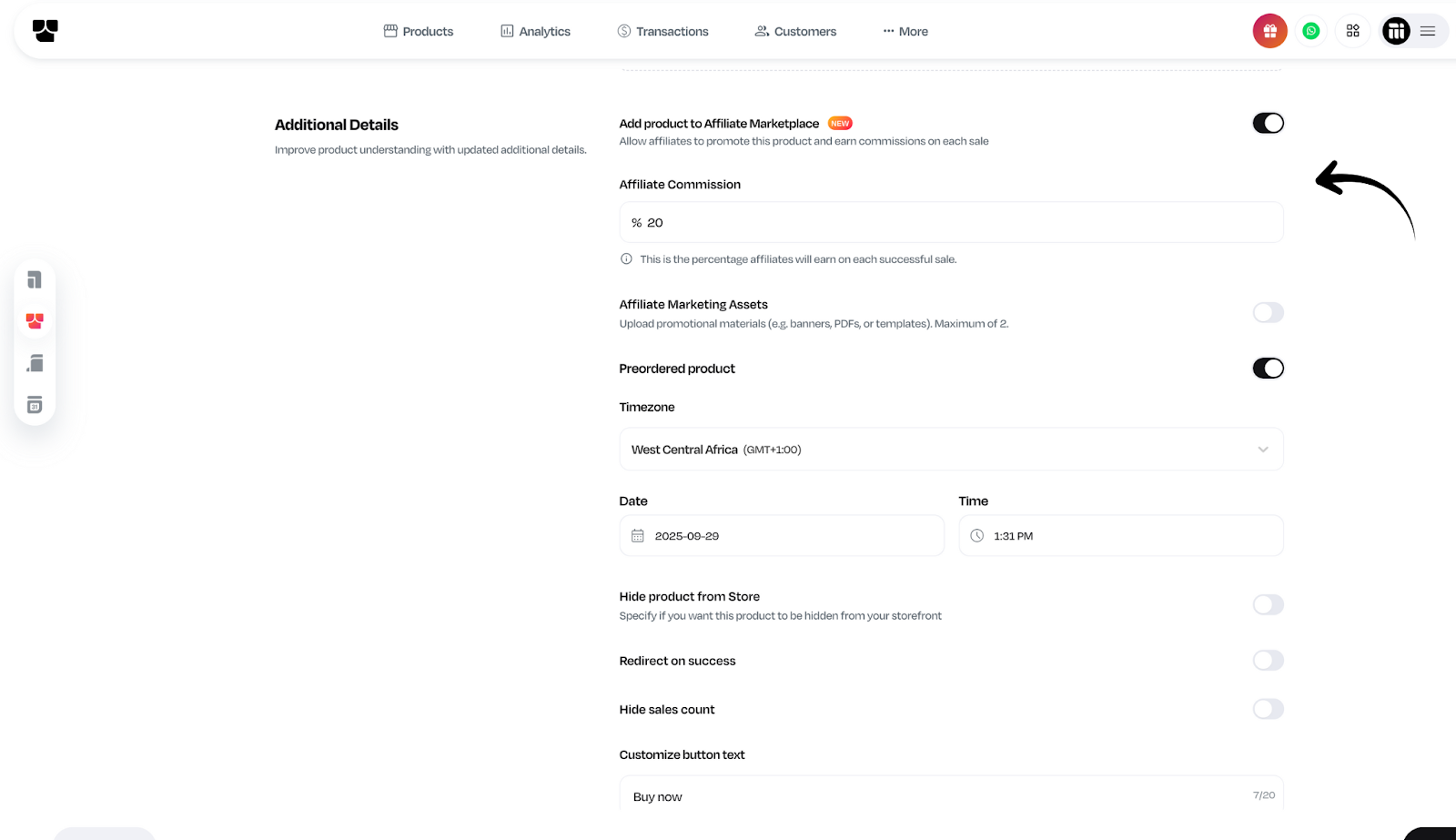
Toggle on the option that says “Add product to Affiliate Marketplace.”

Step 6: Set Your Commission

Decide how much commission you’re willing to give affiliates for every sale they generate.

Step 7: Upload Marketing Assets (Optional)

Help affiliates market your product better by providing:

  • Product images
  • Sales copy or sample captions
  • Any guidelines or FAQs affiliates need to position your product correctly

Think of this as your affiliate toolkit - the easier you make it for affiliates, the more likely they’ll promote your product.

Step 8: Save & Publish

Click Save, and that’s it!
Your product is now live on the Mainstack Affiliate Marketplace and instantly visible to affiliates who can start promoting it.

Every product you list on the Affiliate Marketplace is one step closer to:

  • More sales without spending a kobo on ads.
  • Wider reach by tapping into affiliate networks.
  • Faster growth with zero extra effort.

Affiliate marketing isn’t the future-it’s the now. And with Mainstack, you’re not just selling products, you’re unlocking distribution at scale.

List your product on the affiliate marketplace now! 

Product Updates
Crypto Payments Now on Mainstack
Accept cryptocurrency payments on Mainstack! Now supporting Bitcoin, Ethereum, and more digital currencies for global transactions and enhanced payment
Mainstack Editorial Team
August 24, 2025
10 min read
Read more
Button ArrowButton Arrow

Everything we know about payments is rapidly evolving and at Mainstack, we're ensuring you're at the forefront of this revolution. 

We are pleased to announce that you can now accept cryptocurrency payments directly through your Mainstack Storefront. 

This feature allows you to cater to a growing demographic of customers who prefer or are accustomed to using digital currencies.

How Crypto Payments Work on Mainstack

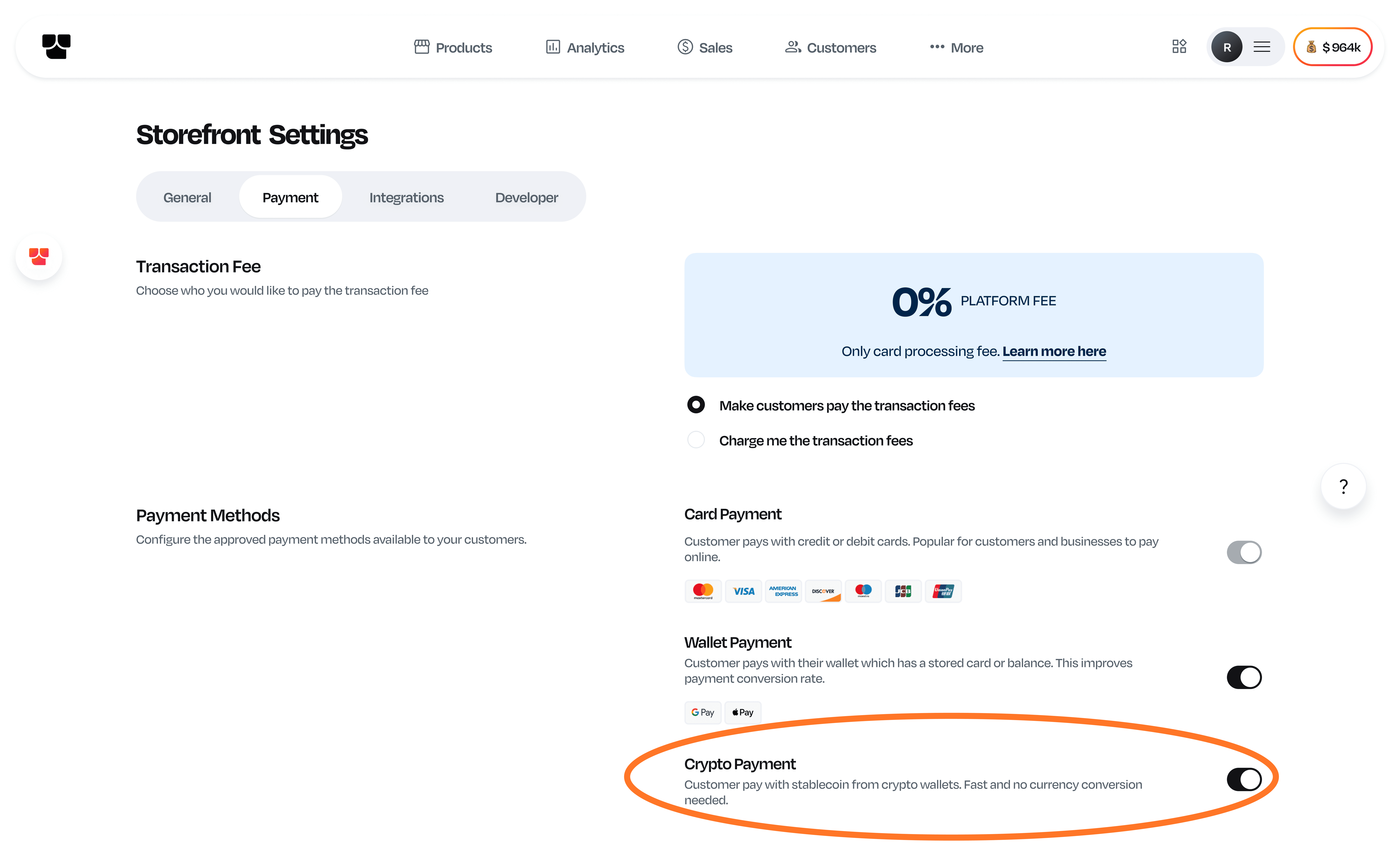
crypto on mainstack.png


  1. Simply go to your Storefront settings and click on 'Payment' to see the crypto payment option. You can toggle it on or off according to your preference. 
  2. Your customers who want to make payment in USD then have the option to pay for your digital products directly from their crypto wallets.
  3. Once payment is made, you'll receive the funds in USD.

Mainstack is committed to ongoing innovation, integrating advanced solutions to help your business not only grow but succeed in the digital age. 

Our vision is to equip you with the tools necessary to eliminate all obstacles to global expansion, enabling your business to become truly limitless.